Release Notes – Hit-Online | January 2026
Release Notes – Hit-Online | January 2026
Updated on 1/1/2026
With this January 2026 update, Hit-Online starts the year with a particularly feature-rich release. The improvements focus mainly on e-invoicing, Peppol compliance, project management, and several cross-cutting optimizations aimed at improving performance, traceability, and process automation.
As always, each new feature was designed to support the operational realities of construction companies while anticipating upcoming regulatory and organizational requirements.
Transactions module – improvements to e-invoices and configuration
E-invoicing
Advanced attachment handling
Attachment handling for e-invoicing has been strengthened to respect technical limits while ensuring access to essential information.
When the combined size of the XML file and PDFs exceeds 25 MB, or when the XML file alone exceeds that size, either the XML is attached to the email, or no documents are attached. A warning clearly indicates that the attachments are too large to be added to the email.
This logic ensures technical compliance without losing access to the information.
Naming of incoming Peppol invoices
The naming of invoices received via Peppol has been standardized. It now consistently follows: PEPPOL – [ID], where the ID corresponds to the identifier found in the XML file, based on the journal and invoice number.
This standardization improves readability and makes documents easier to identify quickly.
Identifying Peppol flows
Two new fields have been added in transactions to clearly indicate whether an invoice comes from Peppol (incoming) or was sent via Peppol (outgoing).
This distinction increases flow transparency, makes checks easier, and simplifies collaboration with accounting and external partners.
Accounting automation – daily invoice forwarding
A new flow has been introduced to automatically forward validated invoices to accounting.
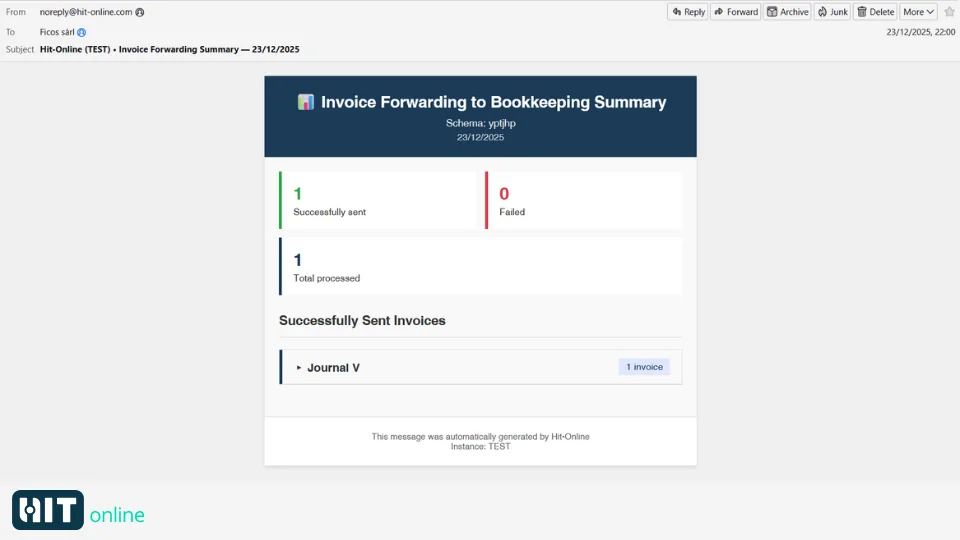
Every day at 10:00 PM, validated incoming and outgoing invoices are sent to the accountant or to the accounting software, based on the defined settings. A summary is sent to the company’s accounting email address, or to the general email address if none is defined.
Emails are sent from noreply@ficos.com.
Configuration – VAT rates and mapping
The configuration of VAT rates has been enhanced with a dedicated selection for Peppol codes. Messages are displayed when selected codes are not consistent with the defined VAT percentage.
For example, it is no longer possible to associate an exemption code with a 21% rate.
These checks strengthen compliance and reduce the risk of errors when exchanging e-invoices.
The VAT mapping between Peppol and Hit-Online is now centralized under Configuration → VAT codes, in the global list.
This centralization makes rules easier to maintain, improves consistency across companies, and ensures more reliable data exchanges.
Forms module – automatic PDF sending
Form definitions now include two new configuration options, depending on the validation type: send the PDF to the author and/or send the PDF to the validator.
When enabled, an email is automatically sent when the form is submitted or validated.
This improvement enhances communication and strengthens validation traceability.
Actions module – notifications and clarity
Notification tracking
When a notification is sent from the action planning, you can now track its status and see whether the recipient has acknowledged it.
This added visibility improves team coordination and reduces misunderstandings in action follow-up.
Clearer action bar
The action bar has been clarified with a better separation of lists. An action whose checkbox is not selected is now identified as recurring, while an action with no task to perform is more clearly distinguished in the information view.
This clarification improves readability and supports smoother operational follow-up.
Planning module – duplicating days
The Planning module now allows you to copy an entire day to one or multiple days.
This feature simplifies team scheduling and saves significant time for recurring site organization.
Projects module – duplicating quotes
A new default configuration makes it possible to automatically duplicate an accepted quote.
When enabled, the quote is locked, a new job is created with copied positions, and if applicable, a prospect is automatically converted into a customer.
This automation secures the transition from quote to execution.
Resources module – import from a project part
It is now possible to import a resource item directly from a project part, which simplifies managing shared data between projects and resources.
Purchasing module – improved logistics management
Delivery notes have received several improvements. A new default setting for cost allocation is now available.
In purchasing, when an order exists, a button allows you to create a delivery note by automatically copying all positions. A dedicated stock movement button then lets you update delivered quantities.
A new delivery notes panel improves readability and logistics follow-up.
General changes
Duplicate warning
When editing an entity, a warning is now displayed if the number being used already exists.
Creation is not blocked, but you are informed about the duplicate risk, improving data quality without making processes overly rigid.
Performance improvements
Global search has been optimized. It now filters only the record’s base data and does not include information coming from joins.
To search on related data, you must use the filters available directly in the relevant columns.
This approach makes search faster and more predictable.
Contacts – new view and Excel import
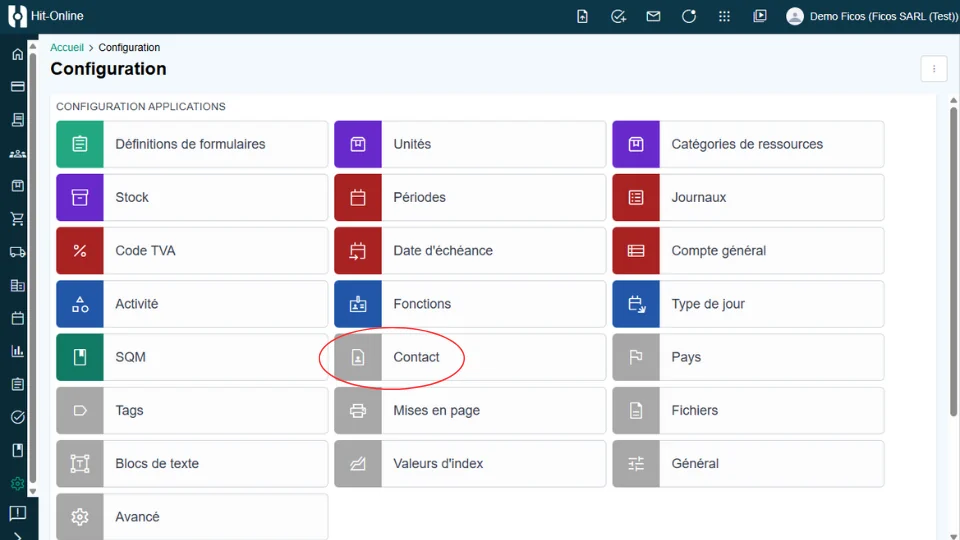
A new Contacts page is now available in the configuration view. You can import contacts via an Excel file, making it easier to centralize and manage contact information.
Conclusion – a structuring release for 2026
The January 2026 update lays a solid foundation for the year ahead. By strengthening e-invoicing, Peppol compliance, accounting automation, and operational project management, Hit-Online continues to evolve in line with the needs of construction companies.
We invite you to explore these new features and share your feedback with our teams.
Discover our January events. Feel free to sign up for a free training session.
If you don’t have an account yet, you can create one for free via Create your free account.
If you have any questions, our support team is here to help, or visit your Hit-Online help space.
Make your construction company future-ready
Trust Hit-Online, the software made by construction professionals for construction professionals.
Get Free Demo