Hit-Online 1.34 Release Notes | November 2026
Hit-Online 1.34: New features and improvements for everyday work
Hit-Online 1.34 introduces improvements designed to make day-to-day operations easier for construction and service companies. Highlights include recurring service contracts, detailed quantity calculations on printed quotations, and a new report for workers’ travel allowances.
The release also brings enhancements to forms, scheduling, progress statements, quotations and invoices, along with new possibilities for custom development. Here is what has changed and how the updates can help your team.
Service contracts: Manage recurring interventions more easily
The new recurring service contract feature helps organise regular maintenance, inspection and service work without having to create every intervention manually.
A new panel within a project lets you create and view service contracts. They are also accessible from the detailed ProjectList view. When creating a contract, you can set a monthly, quarterly or annual frequency and choose the appropriate billing method.
Contracts with automatic invoicing
For contracts designed for recurring billing, Hit-Online can automatically create invoices. At each due date, an invoice and a project section are generated for the planned work. The contract manager receives an email notifying them of the new project section and providing the corresponding invoice.
This is particularly useful for regularly scheduled services with predefined billing arrangements. It reduces repetitive administration while keeping the work and its invoice connected.
Interventions billed on a time-and-materials basis
When the amount to be billed depends on work actually performed, Hit-Online automatically creates a project section to organise and schedule the intervention at each due date. The contract manager is also notified by email.
No invoice is generated automatically for time-and-materials interventions. Invoicing takes place through the usual process once the work has been completed. Both contract types benefit from automatic intervention creation, but automatic invoicing applies only to contracts configured for it.
A new “À planifier” (To schedule) filter in the planning view helps users find interventions that have been created but not yet scheduled.
Quotations and quantity take-offs: Print the calculation details
When a quantity is calculated using the Métré (quantity take-off) feature, you can now include the underlying calculations in printed documents. This helps customers understand how the total quantity was determined.
For example, a painting item might cover a living-room wall (5 × 2.5 = 12.5 m²), a kitchen wall (4 × 2.5 = 10 m²) and a bedroom wall (3 × 2.5 = 7.5 m²), for a total of 30 m².
The print settings let you display either the total quantity alone or each quantity take-off line, including its comments and calculations. This makes quotations more transparent, especially when multiple rooms, surfaces or work areas are involved, without manually copying calculations into descriptions.
Travel allowances: A new detailed report
A new report makes it easier to review workers’ travel allowances. It combines a detailed list of recorded journeys with a summary of compensation amounts by type.
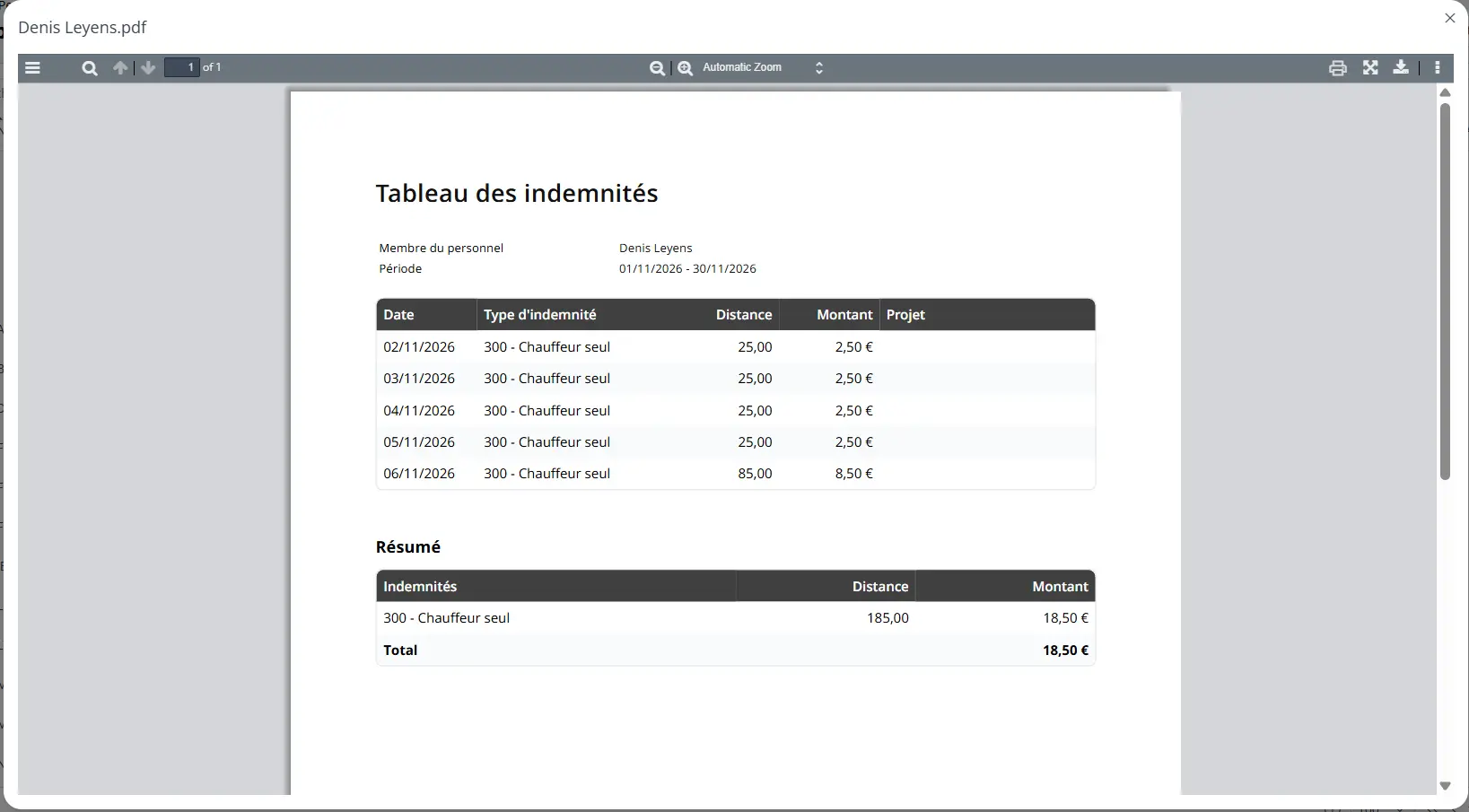
For every journey, the report shows the date, type, distance, amount and associated project. The type can distinguish, for example, between driver and passenger. This provides the context needed to verify the recorded journeys and their compensation.
A separate summary groups allowance amounts by type, providing an overview without losing access to the underlying journeys.
Forms: Multiple selections in an “Option” field
Forms now support multiple selections within a single “Option” field. Previously, only one answer could be selected.
To enable this, open the form definition, select the “Option” field and tick “Sélection multiple” (Multiple selection). This is useful when several answers can apply to the same question and avoids creating unnecessary extra fields.
Planning: A clearer way to sort resources
In the “Staff” and “Projet” planning views, a new option sorts resources by assignment first, then alphabetically.
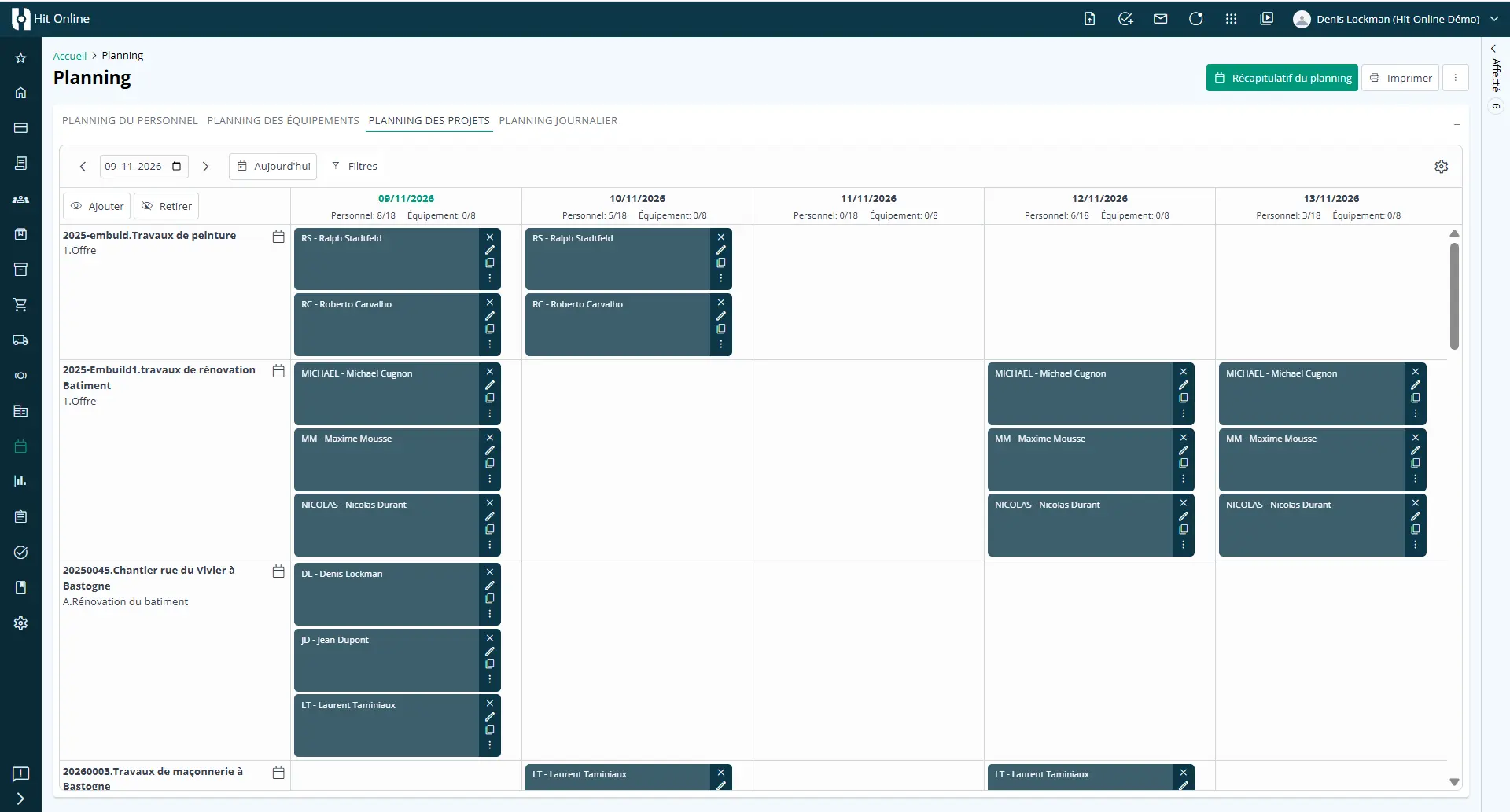
Assigned resources are grouped at the top, making the planning board easier to navigate and reducing unnecessary scrolling. The setting is personal to each user, so everyone can enable it according to their preferences.
Progress statements: A new status field for invoice tracking
Progress statements now include a “Statut” (Status) field to make administrative and invoicing follow-up easier.
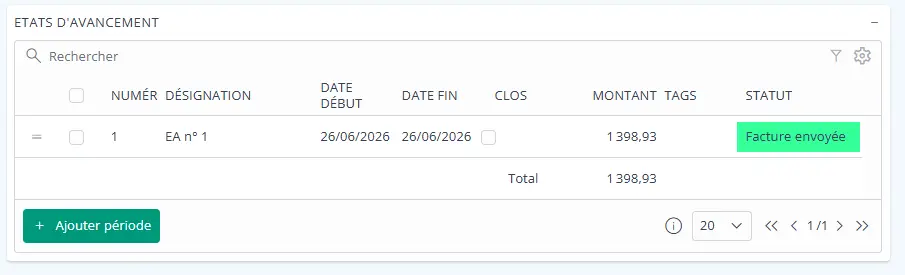
The available values in the French interface are “Facture en cours”, “Facture envoyée”, “Facture acceptée”, “Facture refusée”, “EA facturé”, “Lettre de créance créée” and “Lettre de créance envoyée”.
The new field helps identify which progress statements have been invoiced, which invoices have been sent or accepted or rejected, and the stage reached by any associated claim letters. The labels above reflect the actual software entries.
Invoices: Require a responsible person before validation
Two new settings under Configuration > Général > Comptabilité let companies require a responsible person for purchase invoices and sales invoices independently.
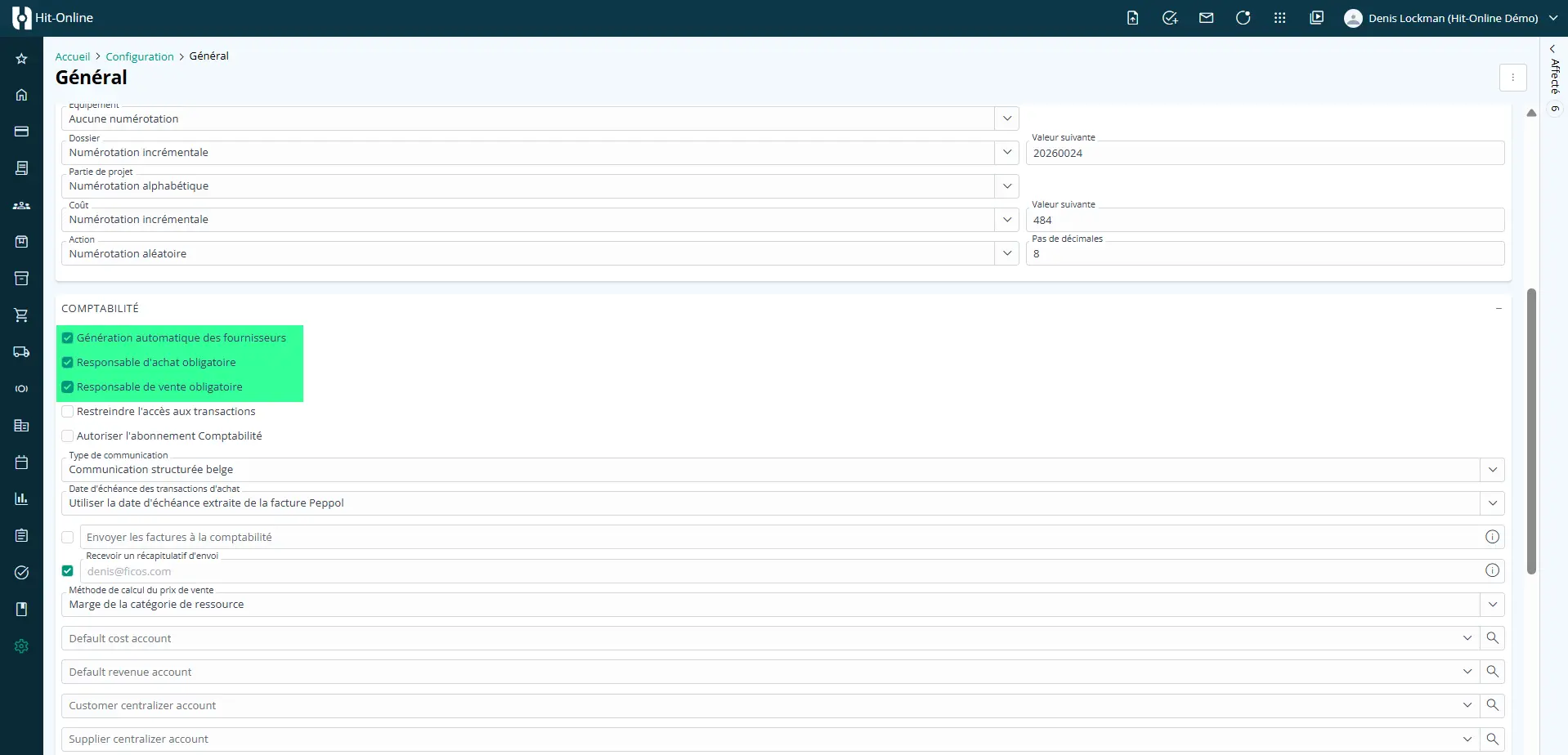
When the relevant option is enabled, an invoice cannot be validated until a responsible person has been entered. Companies can apply this rule to purchases, sales or both.
Both options are disabled by default, so existing validation workflows remain unchanged unless an administrator enables them. This offers an additional way to clarify responsibilities during invoice processing.
Quotations and invoices: Reuse standard texts in the customer’s language
A new feature helps prepare documents in the customer’s language by reusing translations already stored in Hit-Online for standard elements. These can include texts from resources, units, journals and other translated standard entries.
While preparing a quotation or invoice, the user manually clicks a button to refresh these texts based on the language recorded in the customer profile. The software does not automatically translate the entire document.
Texts entered manually in a quotation or invoice are not translated. They must be written directly in the customer’s language. Standard texts can only be updated where a translation is already available in Hit-Online.
Custom development: Adapt Hit-Online to specific requirements
Every company has its own processes. Some need a particular feature or want to automate an internal step that is not covered by the standard software.
Hit-Online now offers additional possibilities for custom development, assessed against each customer’s needs. Examples could include creating actions from form responses, sending notifications when invoices meet certain criteria, adding specific information to printed documents or performing extra checks during validation.
These are examples of potential bespoke adaptations, not standard features available to all users. Implementation is subject to an assessment of requirements and technical feasibility, followed by development on request.
The goal is to adapt selected parts of Hit-Online to the way a company works. Our team can discuss what might be possible for your organisation.
Electronic invoicing: Check XML files exceeding 25 MB
In Hit-Office and Hit-Online, an error message now appears when an electronic invoicing XML file exceeds the permitted 25 MB limit.
This makes oversized files immediately identifiable and prevents their submission in that state, while giving users a clearer explanation of the issue.
Duplicating transactions: Preserve decimal precision
Previously, duplicating a transaction always reset the number of decimal places to two, even if the original transaction used a different precision.
This has been corrected: the duplicated transaction now retains the original number of decimal places. Users no longer need to restore the setting manually.
Quotations: Use variables throughout the document
The “bâton magique” (magic wand) feature for variables in quotations has been extended. Variables are no longer restricted to one specific section: they can now be used throughout the quotation.
This makes it easier to reuse information across different sections and manage variables consistently in more complex quotations.
Hit-Online 1.34: More connected workflows
With version 1.34, Hit-Online improves everyday tasks, from clearer quotations and travel allowance reporting to recurring service work, invoice controls and multilingual customer documents.
Recurring service contracts are a significant step forward for companies providing regular services. The other updates target smaller but valuable improvements that reduce repetitive work and make information easier to find.
To learn more about these features or discuss a custom development, visit Hit-Online and contact our team.
See it for yourself - in 30 minutes
We show you Hit-Online live - tailored to your trade and your situation. No sales pitch, no pressure. Just an honest demo so you can see whether Hit-Online is the right fit for your business.