Release Notes – Hit-Online | October 2026
Hit-Online 1.33: Practical New Features to Make Your Day-to-Day Work Easier
With version 1.33, Hit-Online continues to evolve to support you even more effectively in your daily work.
Resource management, project tracking, personnel hours, commercial documents and electronic invoicing: this update brings several improvements designed to simplify your tasks, centralise information and streamline your workflows.
Discover the main new features in this release!
Resources and projects: better-organised information
Technical data sheets linked directly to your resources
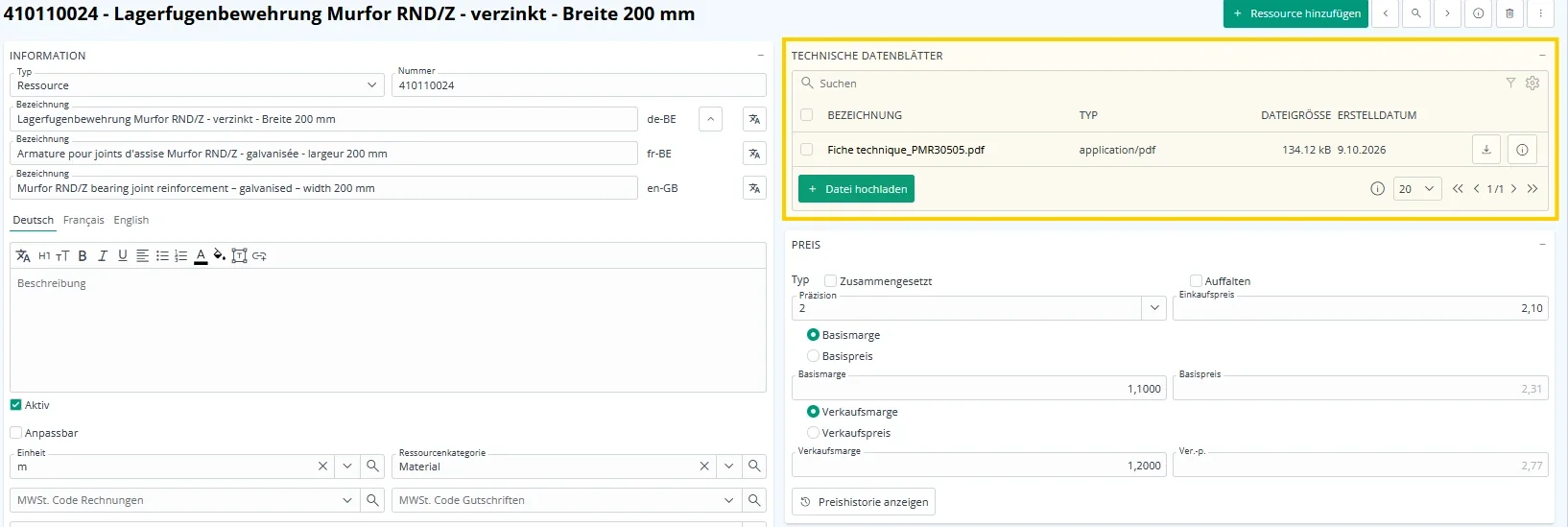
You can now attach a technical data sheet directly to a material resource in Hit-Online.
When a resource is used in a project or project section, its technical data sheet can be linked and consulted there. You can also record its approval status by the architect or other relevant stakeholders.
Approval takes place outside Hit-Online, and its status is then entered manually in the software.
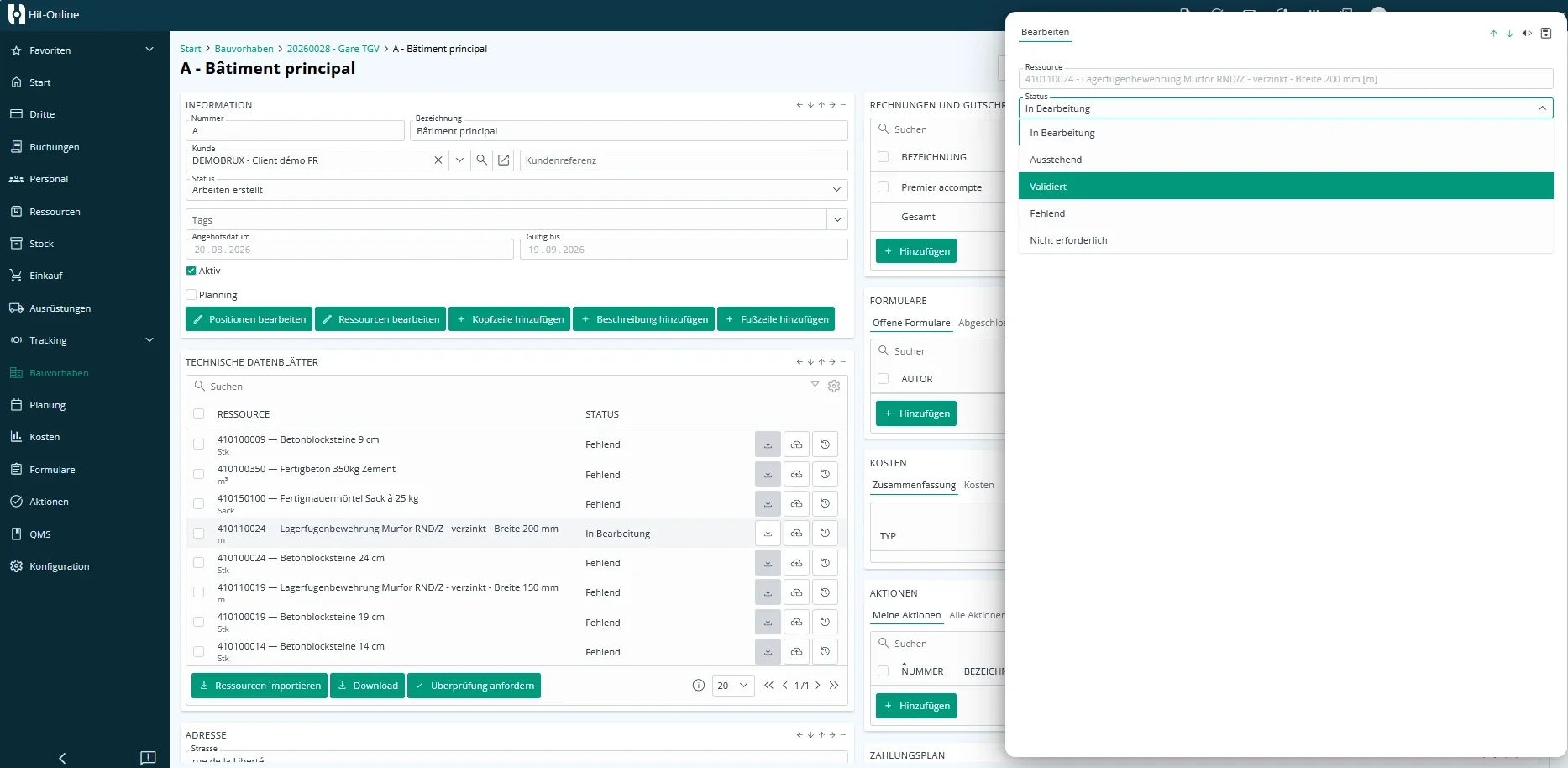
What’s in it for you? Technical information and approval statuses are grouped together in the context of your projects. You can find the documents you need more easily and keep a clearer overview of approvals.
A specific address for each project section
You can now enter an individual address for each project section.
To enable this feature, simply tick the “Les parts de projet ont une adresse individuelle” option in the project. You can then define a specific address for each project section.
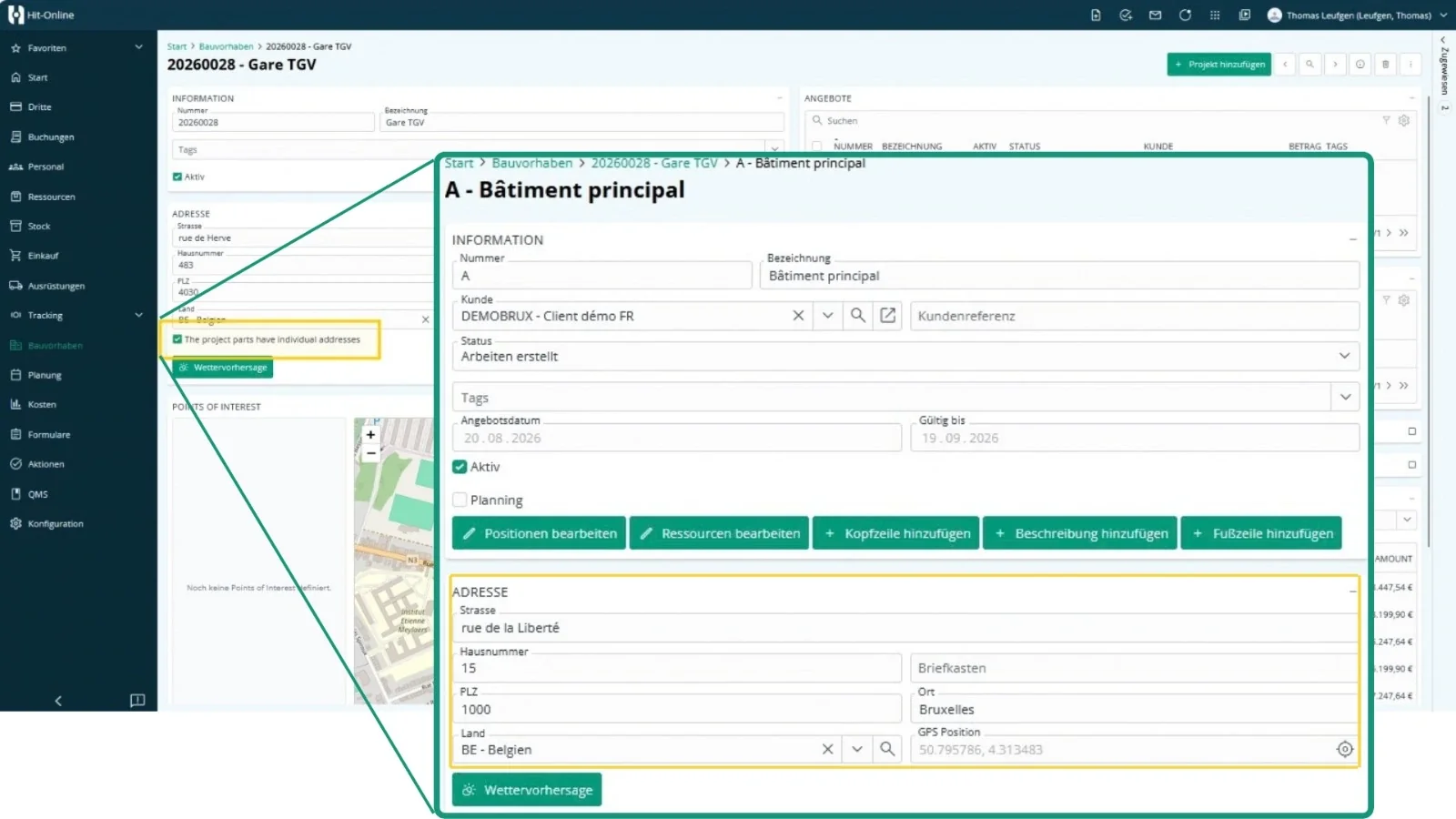
A practical improvement for projects involving several buildings, sites or work locations.
Adding resources: an initial quantity of 1
When adding a resource to an item, Hit-Online now automatically suggests a quantity of 1, which you can then adjust as needed.
A small change that makes entering items easier.
Personnel: simpler, more consistent time management
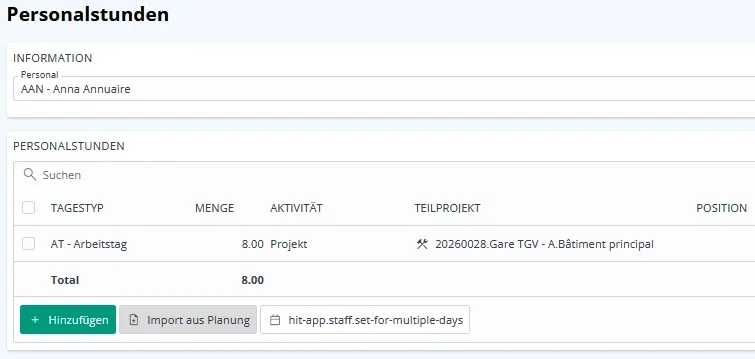
Smarter import of working hours from the schedule
Importing personnel hours from the schedule has been improved to make better use of information already recorded.
Hit-Online now automatically applies the following rules:
- If a duration is specified in the daily schedule, it is used to initialise the hours.
- If no duration is specified, the software uses the usual hours defined for that day in the employee’s profile.
- When an employee works on several projects, these rules are combined to respect the total hours for the day.
The result: hours are transferred more consistently from your schedule, with fewer manual adjustments during entry.
More options for your reports
The Personnel module also includes several improvements:
- Full employee profile printout: print all the information in an employee’s profile.
- New personnel hours report: an additional report is now available.
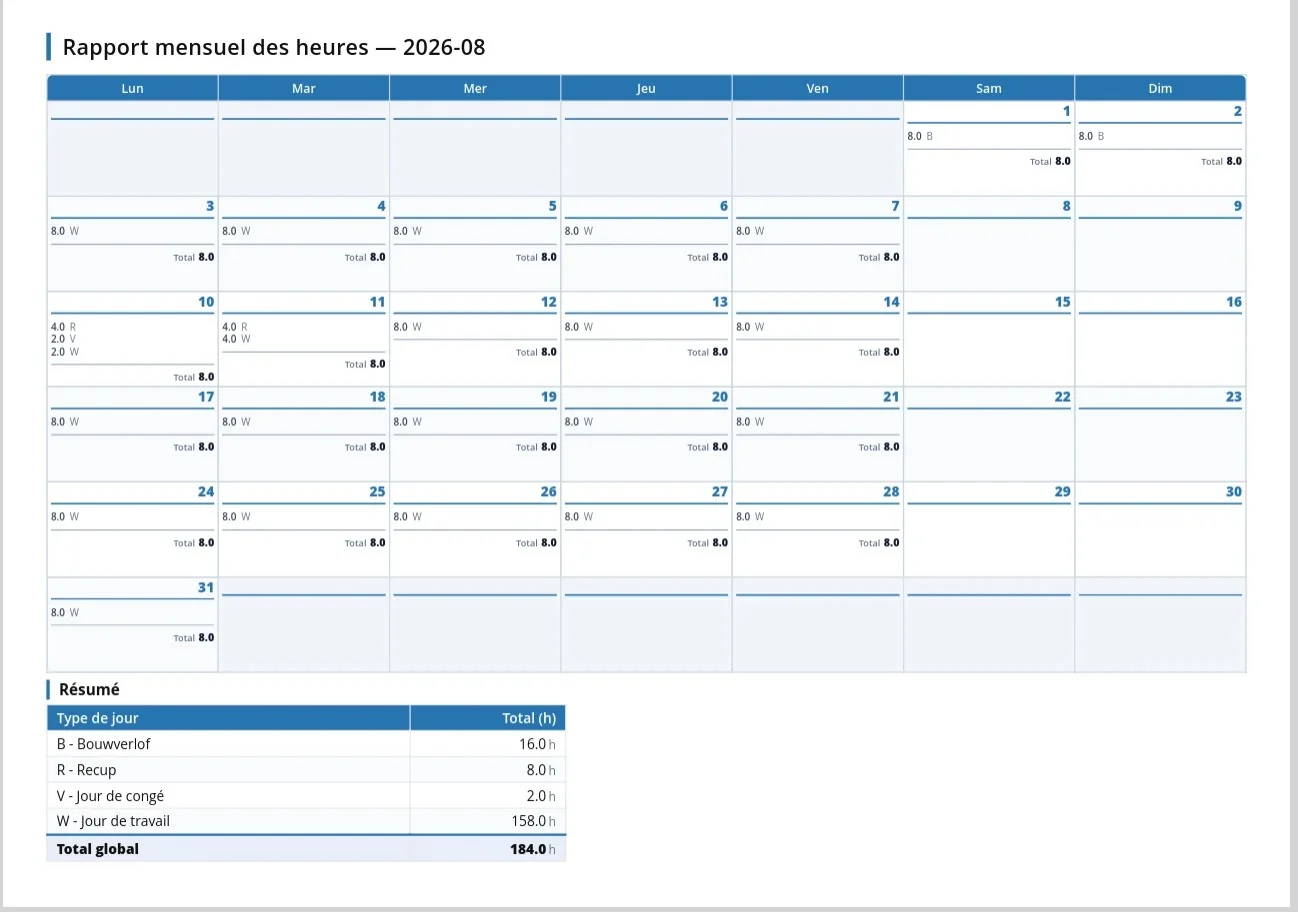
- Monthly hours report: the layout has been updated to display one employee’s hours for a full month on a single page.
This gives you a clearer, more structured view of hours worked by employee and by month.
Quotes and invoices: more flexible documents
Version 1.33 also brings several improvements to printing your commercial documents.
Display the information that matters
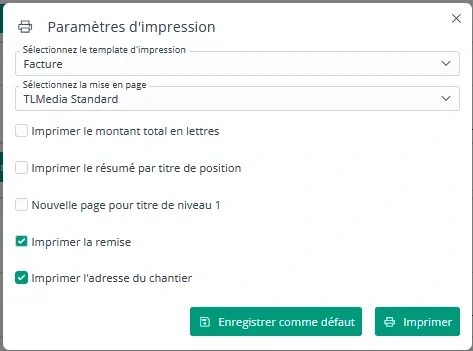
The print settings now offer additional options:
- Displaying discounts: choose whether discounts appear on your quotes and invoices.
- Site address on invoices: display this information by ticking a checkbox in the print settings.
You can therefore tailor your documents more easily to the information you want to share with your customers.
Item order preserved when printing
The order of items on printed quotes now matches the order shown in the Hit-Online interface.
This means you see the same arrangement on screen and in your printed documents.
Third parties and responsibilities: less repetitive data entry
Roles assigned automatically
Do you regularly assign the same responsibilities when creating new records?
Under Configuration > Rôles, you can now define default roles for each type of entity.
For example, if someone is usually the sales contact for your third parties, you can set that person as the default. When a new third party is created, they will automatically be assigned to that role.
Of course, these responsibilities can still be changed individually afterwards.
The benefit: less repetitive data entry and more consistent assignment of responsibilities.

Print complete customer and supplier profiles
In the Third Parties module, a new print option lets you generate a complete profile of a customer or supplier.
Handy for consulting or sharing information stored in Hit-Online.
Better VAT number validation
When entering a VAT number for a third party, Hit-Online now validates it according to the country concerned.
This check makes it easier to spot certain data-entry errors.
Peppol and accounting: more reliable processing
Version 1.33 also includes several improvements to make electronic invoice processing easier and reduce errors.
More flexible handling of Peppol warnings
When receiving an invoice via Peppol, the VAT rate in the XML file may sometimes differ from the rate entered in Hit-Online.
It is now possible to dismiss this warning when justified, allowing you to continue processing the invoice.
Clearer error messages
If a VAT code used in the Peppol code mapping has been deleted, Hit-Online now displays a message indicating that the code cannot be found.
This makes it easier to identify the source of the problem and correct the relevant configuration.
Improved XML restoration
Restoring a transaction from its XML file has also been improved:
- An unnecessary duplicate warning no longer appears when the document detected is the very transaction being restored.
- Restoring a transaction from its XML file no longer triggers another email to be sent.
Better validation of accounting email addresses
When configuring the sending of invoices to accounting, Hit-Online now checks the email address format.
If an invalid address is entered, an error message appears and the previous value is retained. The option to send invoices to accounting cannot be enabled without a valid address.
These improvements help make the processing of your accounting documents more reliable and predictable.
And more: handy little shortcuts!
Sometimes the smallest details save time in everyday work. Hit-Online 1.33 also introduces a new way to select items in lists.
Select multiple rows in one go using the SHIFT key.
Click the first row, hold down SHIFT, then click another row: all rows between them will be selected automatically.
This familiar behaviour, similar to that of a file explorer, is now available in Hit-Online lists.
Hit-Online keeps evolving with you
With version 1.33, we continue to pursue our goal: providing software that is increasingly practical, consistent and suited to the realities of your work.
Whether it’s finding technical documents more easily, simplifying personnel time management or customising your printouts, every improvement is designed to make using Hit-Online easier day to day.
Have a question about these new features? Our FICOS-Service team is here to help!
See it for yourself - in 30 minutes
We show you Hit-Online live - tailored to your trade and your situation. No sales pitch, no pressure. Just an honest demo so you can see whether Hit-Online is the right fit for your business.