Release Notes – Hit-Online | August 2026
Release Notes – August 2026
The August 2026 release introduces numerous developments designed to make Hit-Online smoother, more consistent and more efficient in the daily operations of construction companies.
Particular attention has been given to the Offers module, which continues to expand to support increasingly advanced operational requirements. Tags for positions, position groups, position duplication and new customisation options provide greater flexibility when preparing and organising offers and projects.
These improvements are part of our ongoing effort to simplify the creation, maintenance and monitoring of project files while delivering a better user experience. Information can be structured more effectively, repetitive operations are reduced and essential data can be accessed more quickly.
This release also strengthens status workflow management, particularly in the Purchasing and Transactions modules. New controls provide more precise management of order receipts, including the handling of material overdeliveries.
Several improvements to invoice and transaction processing also increase the reliability of accounting workflows. Automatic invoice validation, changes to VAT calculations, warning management and developments related to electronic documents, including PEPPOL and e-Invoicing, help secure the validation cycle.
In addition to these major developments, this release includes numerous usability improvements, new integrations, enhanced form functionality and several configuration and administration optimisations.
Project modules
Using tags in positions
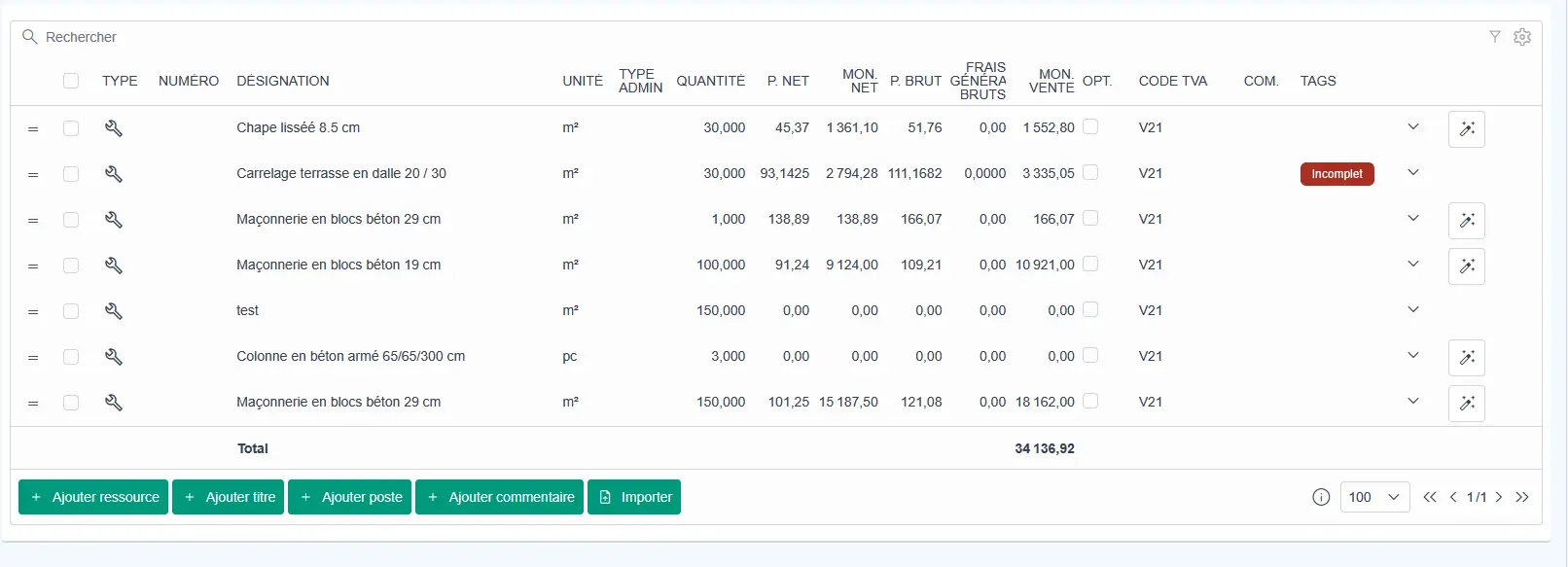
You can now add tags to positions in an offer or project to make them easier to classify, identify and filter.
The tag column is hidden by default. It can be activated in the grid configuration to adapt the display to each user’s requirements.
This feature can be used, for example, to highlight an incomplete position, identify an item that requires verification or flag information that still needs to be completed before an offer is sent.
Duplicating a position
You can now duplicate a position directly within a project section or an invoice.
To do this, select the relevant position and click the duplication button. The new position is automatically added directly below the selected position.
This feature saves time when several similar positions need to be entered. Quantities, resources or descriptions can then be adjusted without recreating each line from scratch.
Improved position calculation details
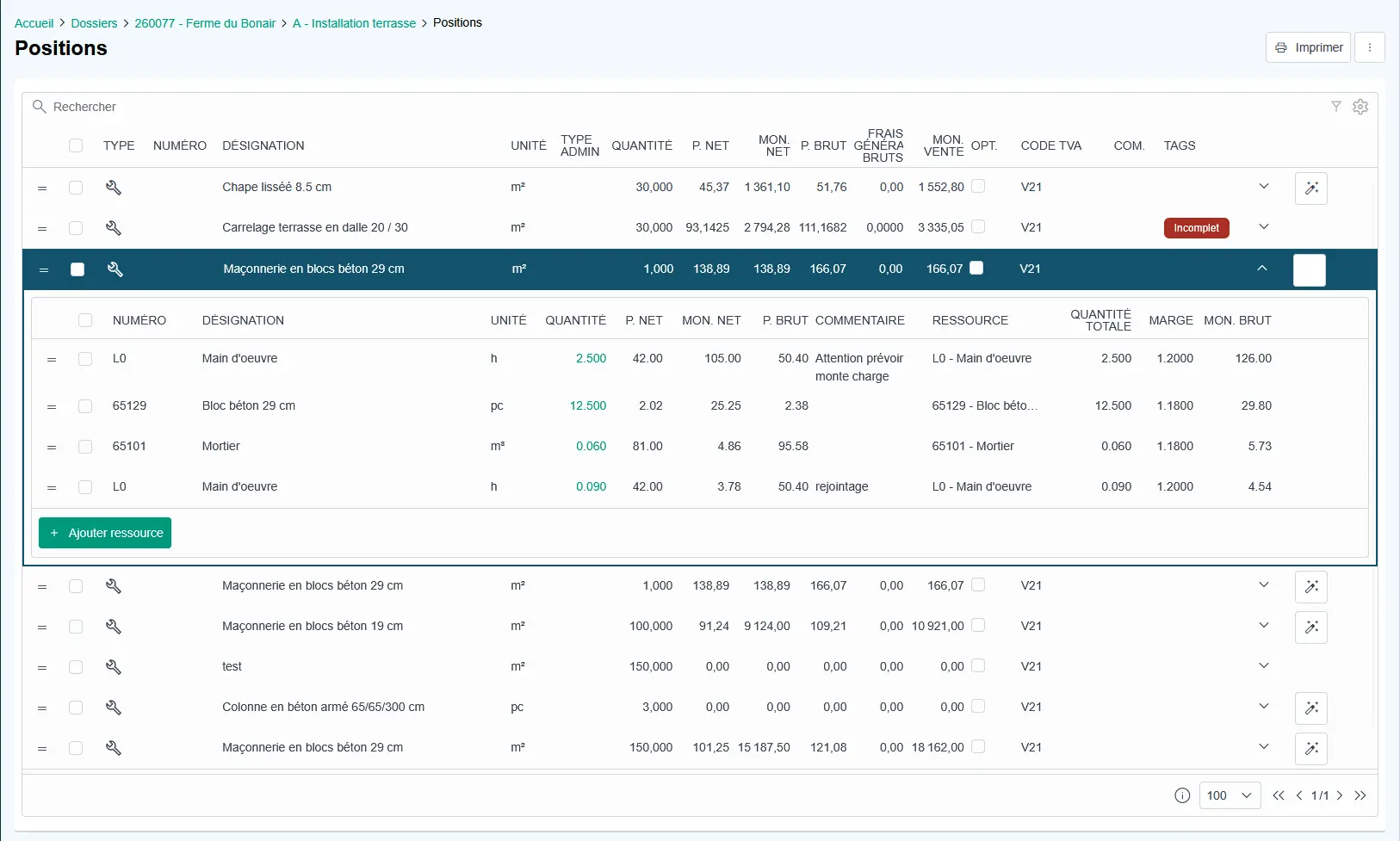
Views containing positions or hierarchical tables now benefit from a new visual style for expanded levels.
This update makes it easier to distinguish between different levels of information and improves the readability of calculation details. Users can more easily understand how a position is composed, which resources are linked to it and which elements influence its price.
Managing project file activation
The status of projects and project sections is now synchronised automatically.
When all sections of a project are deactivated, the main project file is automatically deactivated. When a main project file is deactivated, all associated project sections are also deactivated.
This synchronisation prevents inconsistencies between a project file and its subdivisions. It also simplifies the management of completed, cancelled or temporarily suspended projects.
Updating the completed percentage by quantity
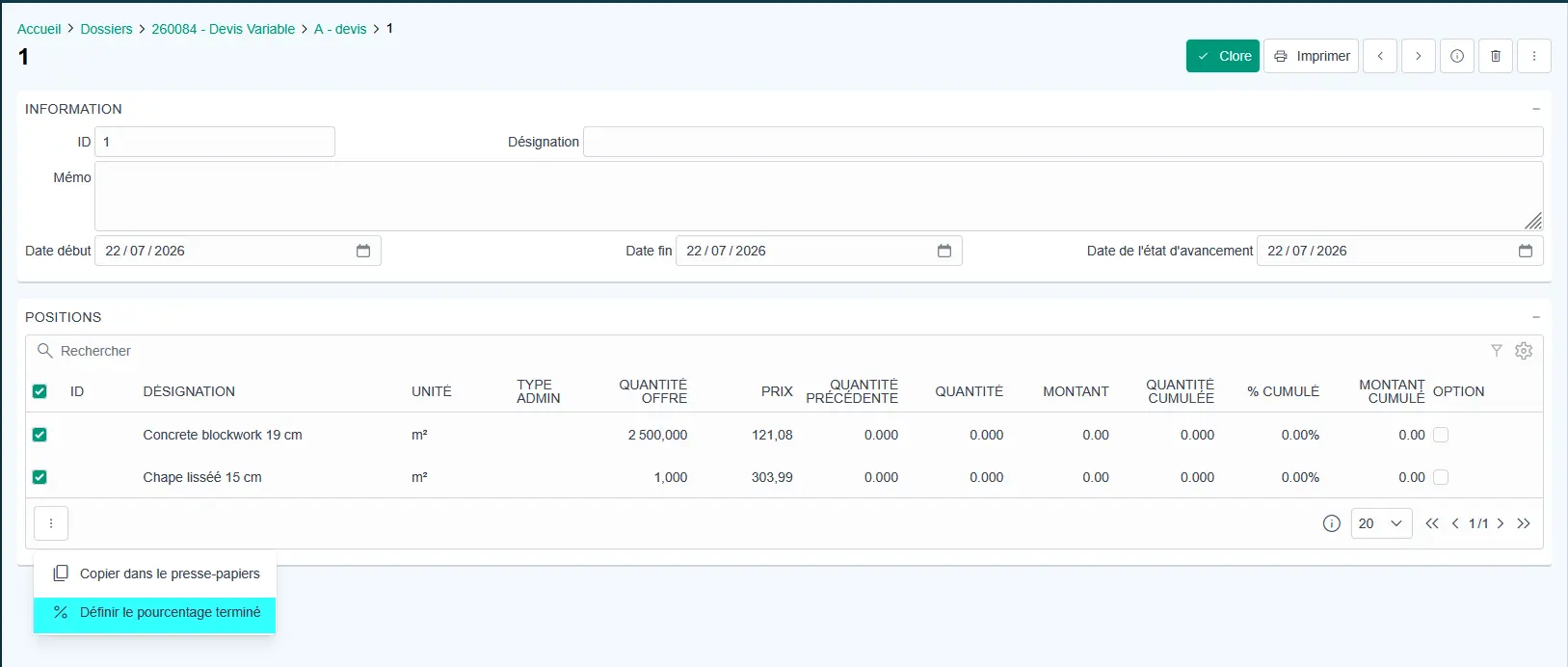
You can now update the completed percentage of a quantity directly from a progress statement.
The change can be made line by line when a precise adjustment is required. It can also be applied to several lines at the same time by using the available grid actions.
This development simplifies progress statement updates and enables teams to reflect the actual project situation more quickly.
Position groups
You can now create position groups to structure the positions in an offer or project more effectively.
Position groups make it possible to combine several detailed positions under a broader work category. They can be used, for example, when recording working time.
A worker can record time under the “Drainage” group without having to choose immediately between a position for installing a 110 mm pipe and another position for installing a 160 mm pipe.
This approach simplifies time tracking on site while maintaining a detailed structure within the project file.
Sending offers by email
All file types can now be attached when sending an offer by email.
Previously, only PDF documents could be included. Users can now attach spreadsheets, technical documents, plans, photographs or other supporting files.
This development makes it easier to send a complete file to a customer or partner without using an additional communication channel.
New printouts available in project files
A new tender printout is available. It can display the amount of each position in words.
The report for resources required by a subproject can also show the detailed calculation for each position.
These new print options provide greater transparency and make it possible to produce documents that are better suited to the requirements of customers, partners and administrative procedures.
Resource management
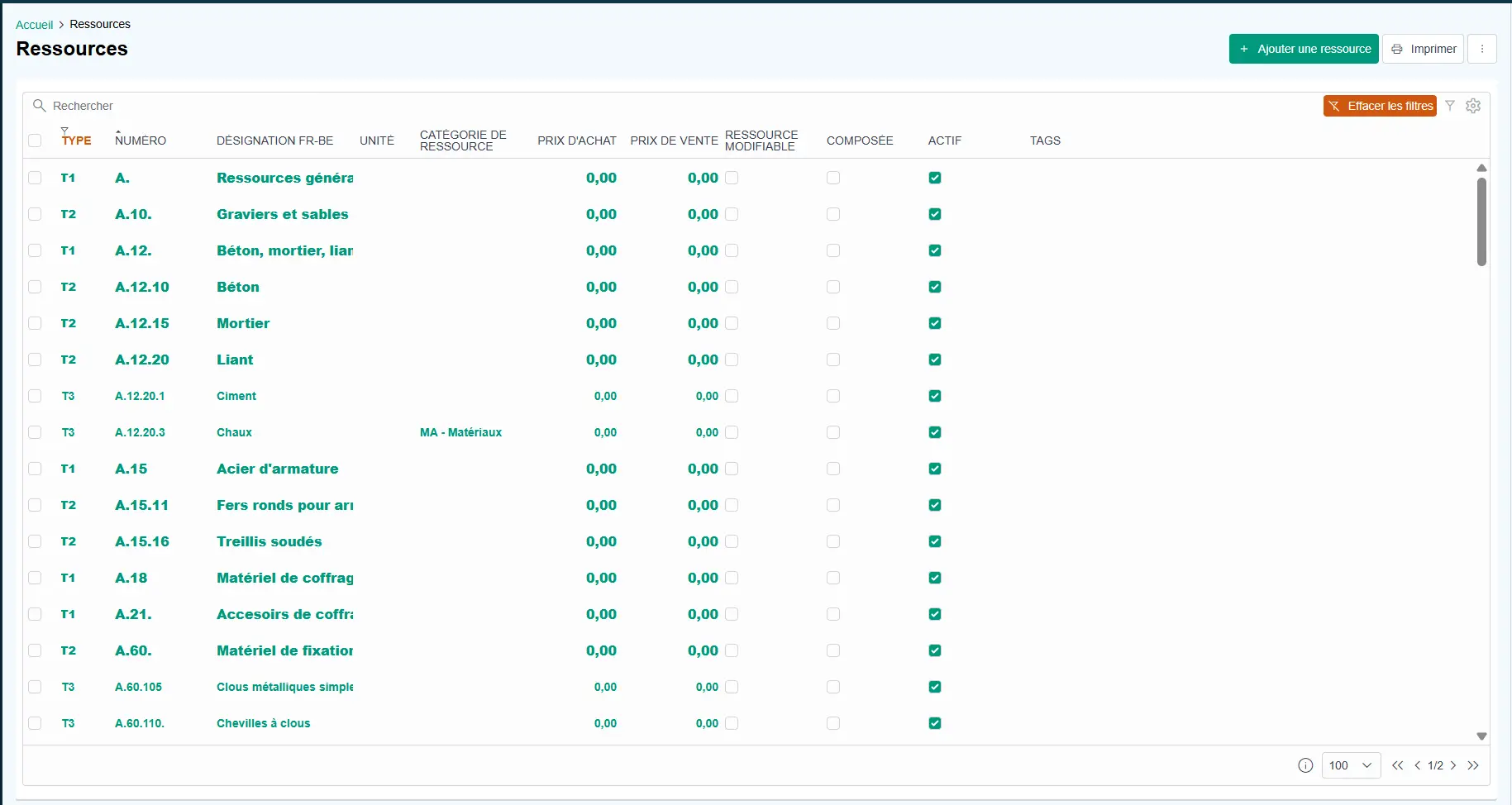
Displaying units
When selecting a resource in the different modules, its unit is now displayed.
This additional information makes quantity entry easier and reduces errors caused by using the wrong unit. Users can immediately see whether a resource is expressed in hours, metres, square metres, pieces, kilograms or another unit.
Database import options
Several new options make it easier to import and update resource libraries.
DataNorm import
You can now add a supplier catalogue directly from a DataNorm file.
This functionality simplifies the integration of external catalogues into Hit-Online and enables companies to use supplier references, descriptions and prices more quickly.
Importing the standard Hit-Online library
Hit-Online provides a library of resources and positions specifically designed for the construction sector.
This library can now be imported in full or by individual chapter. Each company can therefore select the data that corresponds to its activities without importing unnecessary content.
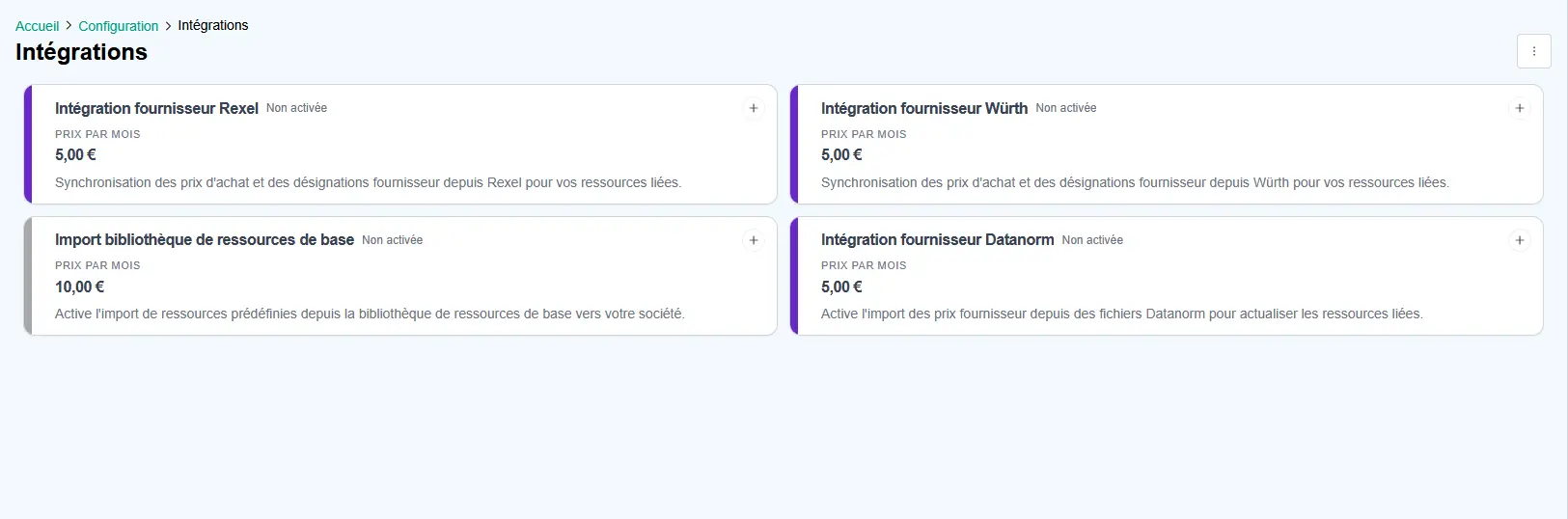
Würth and Rexel supplier catalogue integrations
The Würth and Rexel connectors can now be activated in Hit-Online.
These integrations automatically update the price library while taking the company’s individual conditions and discounts into account.
Users therefore have access to more recent pricing information when preparing offers and projects.
Transactions and invoicing
VAT calculation and rounding management
The VAT calculation has been revised to reduce rounding differences observed when importing invoices.
This improvement provides better alignment between the amounts calculated in Hit-Online and the values shown on incoming documents. It reduces manual corrections and improves consistency between electronic invoices, accounting entries and recorded totals.
Negative quantities on electronic supplier invoices
For invoices containing a negative amount, this is now correctly represented by a negative quantity combined with a positive gross amount.
The gross amount of a position therefore remains positive, while the negative value is represented by the quantity.
Previously, a negative gross amount could be displayed for the corresponding invoice positions. With this adjustment, negative amounts are now represented correctly and consistently through the quantity.
Warning management
When a warning on an invoice is ignored, the corresponding banner now closes correctly.
The affected line is also no longer displayed in orange in the invoice list.
Warnings can indicate a discrepancy within invoice lines, missing information or the detection of a potential duplicate invoice.
This improvement makes the interface more consistent and helps users identify which warnings still require attention.
Invoice status
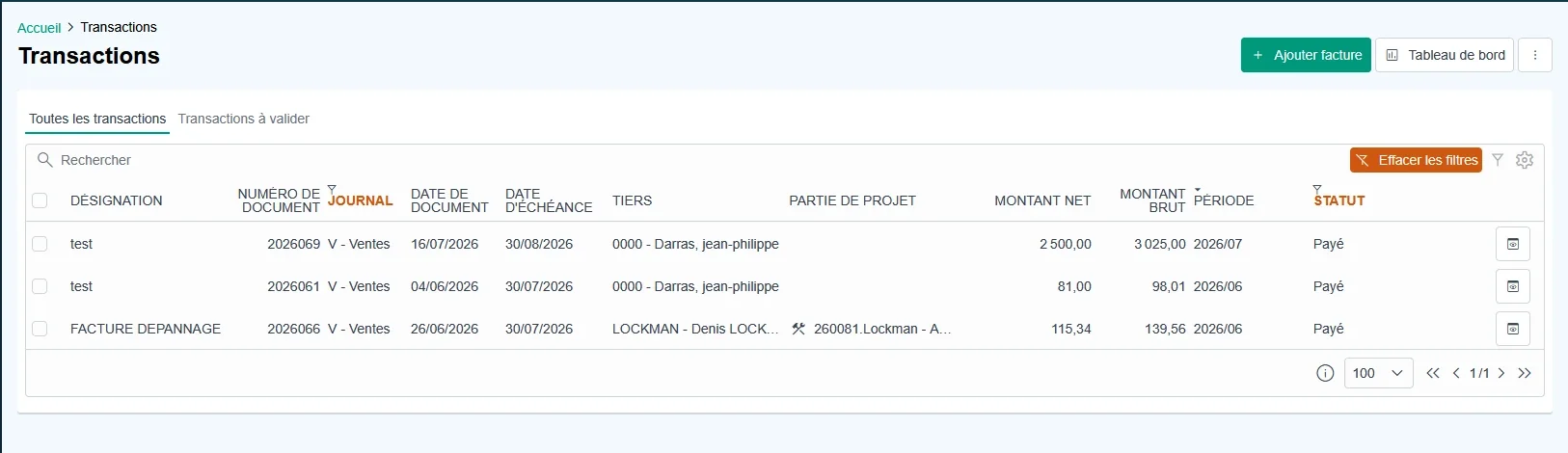
It is now possible to assign a status to an invoice.
An invoice can be marked as sent, accepted, paid, rejected or disputed.
This functionality improves the administrative and financial monitoring of documents. Users can quickly identify invoices that require a reminder, verification or another specific action.
Automatic invoice validation
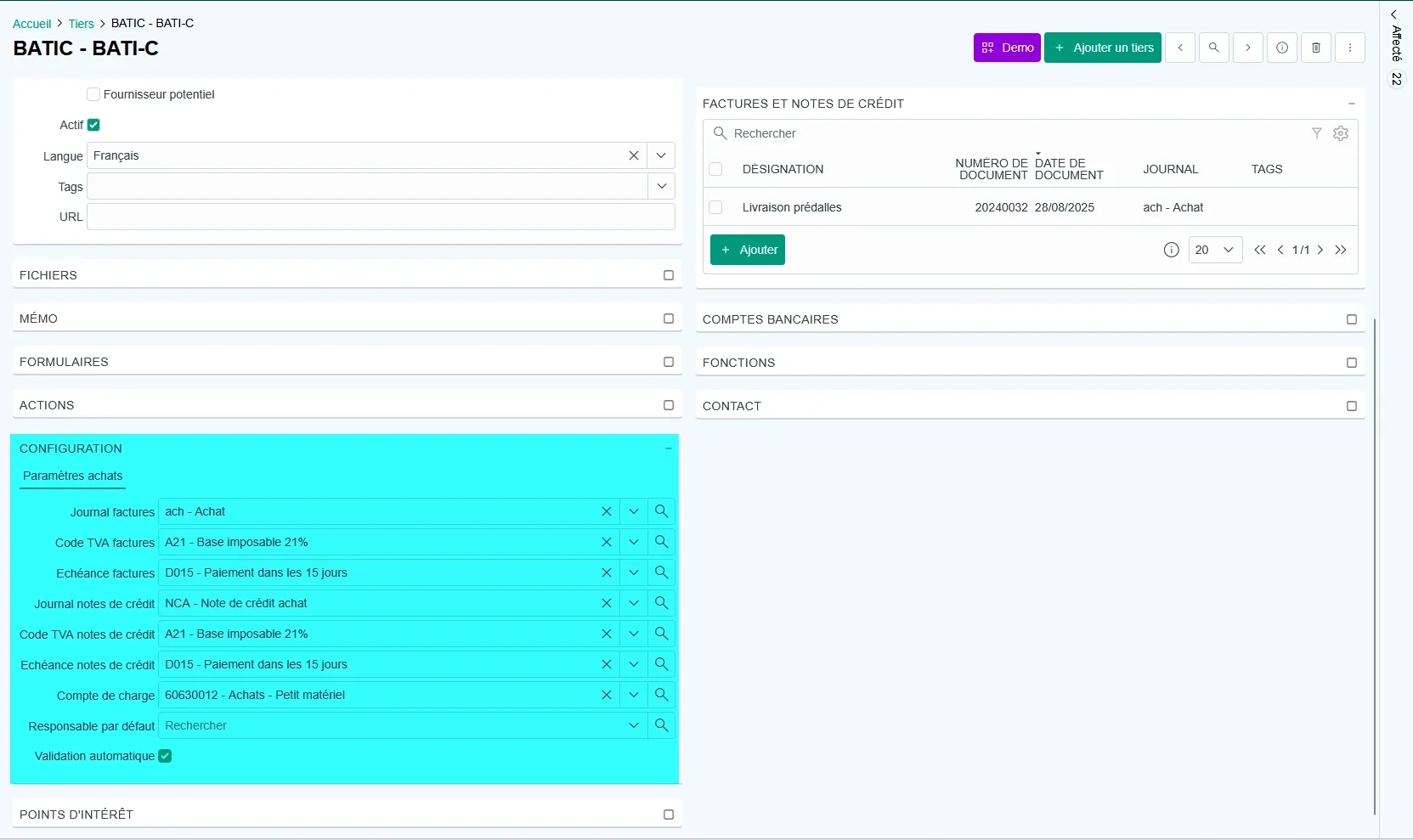
You can now activate automatic invoice validation for a business partner.
This option is available when certain information has been completed in the supplier configuration. The supplier record must contain a default VAT code for invoices, a default VAT code for credit notes and, where applicable, a default expense account for export to Hit-Office.
Automatic validation is only carried out when no errors are detected during invoice processing. This includes duplicate invoices, incomplete lines and inconsistent information.
Validation is also prevented when a numbering gap is detected in the accounting journal.
This development automates the processing of reliable invoices while maintaining controls for documents that require verification.
Forms
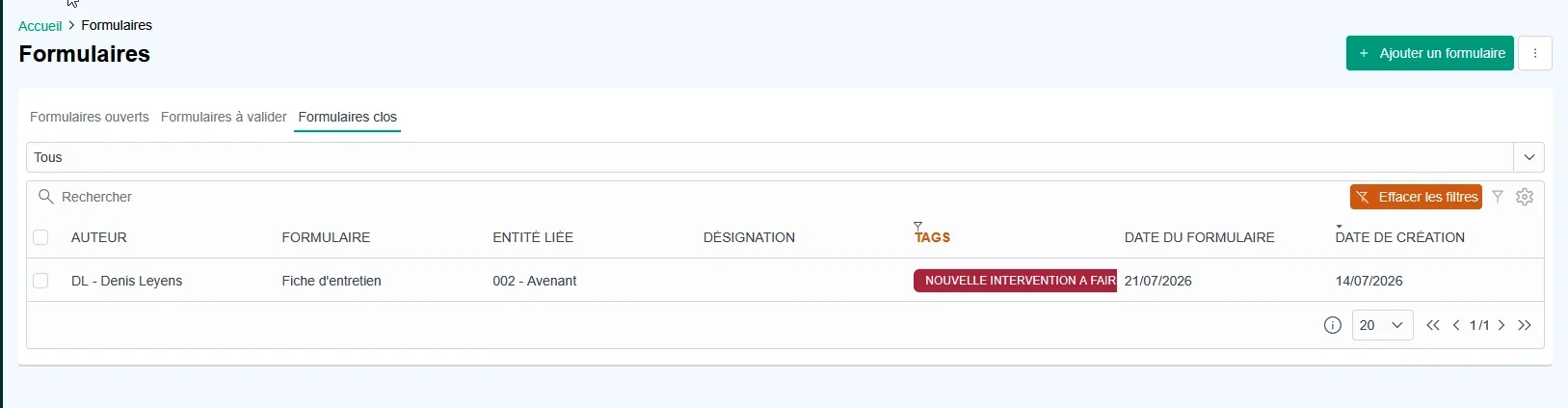
Using tags
Forms now support tags, provided this functionality is activated in the form definition.
Tags can be used to identify a form requiring a specific action. In an intervention form, for example, a tag can indicate that rescheduling must be carried out by a member of the office team.
This improvement simplifies request monitoring and enables administrative teams to identify forms that require attention more quickly.
Advanced hour calculation
The rules for calculating hours are now more flexible.
A quantity can be calculated from a direct numerical value, a field containing a start and end time or two separate fields representing the arrival and departure times.
Automatic break management is also available through the dedicated quantity_break_minutes and quantity_break_hours fields.
This development enables forms to be adapted to different working-time arrangements and reduces manual calculations when recording work performed.
Conditions applied to sections
Conditions can now be applied to an entire form section rather than only to individual fields.
A complete section can therefore be shown or hidden depending on the user’s previous answers.
This feature makes it possible to create more dynamic forms that are easier to complete and better suited to the different situations encountered on site or in the office.
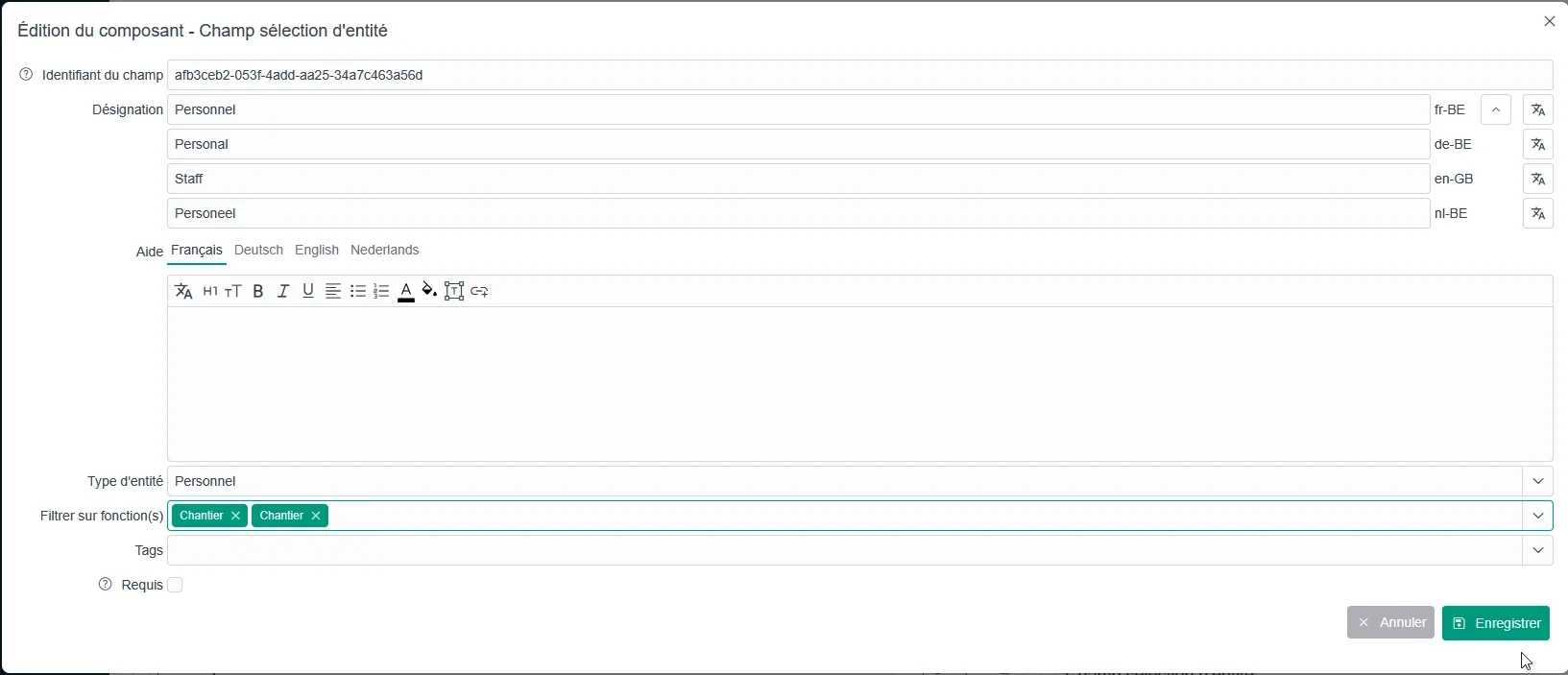
Personnel filtering
Personnel selection fields can be restricted according to user roles or functions.
The required function must be selected in the form definition. Only people matching that function are then displayed in the list.
This improvement reduces selection errors and makes it easier to assign a task to the appropriate profile.
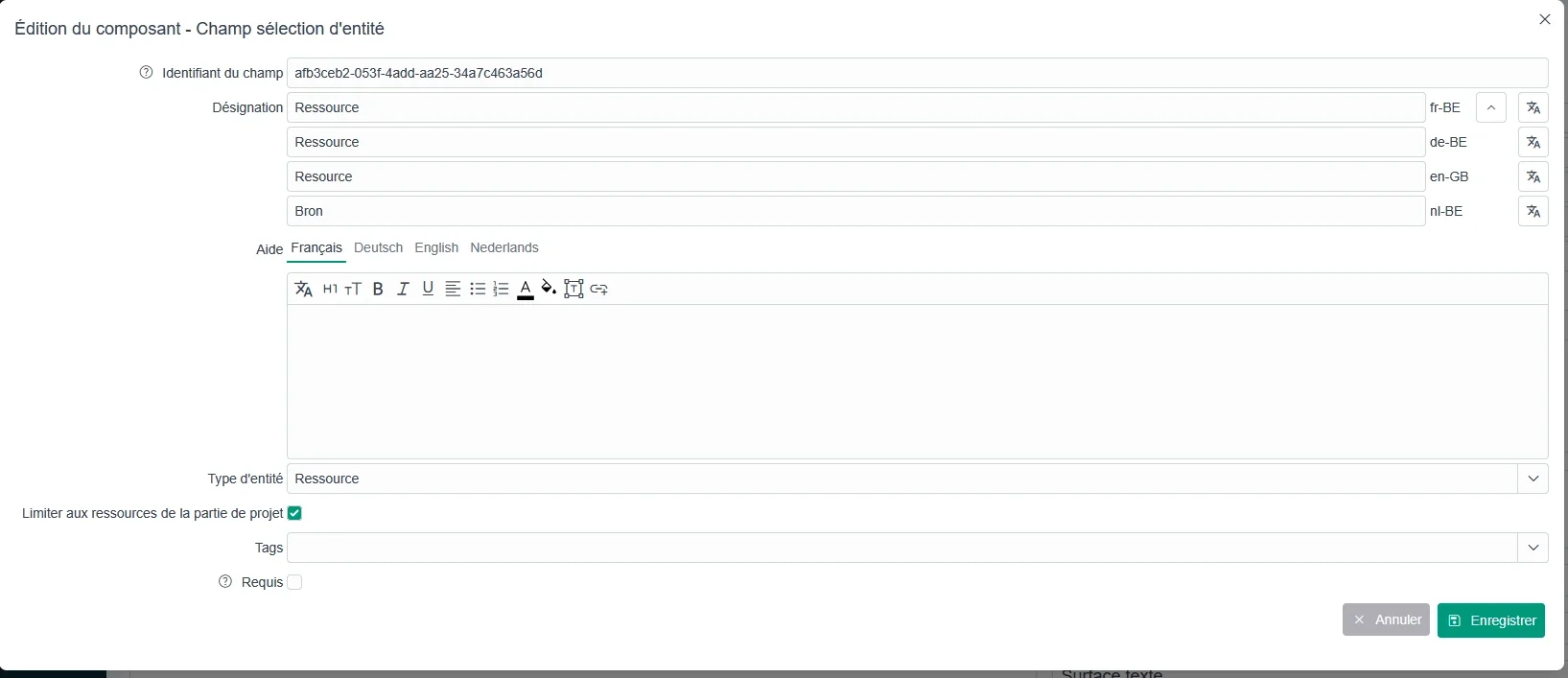
Resources limited to a project section
When a form is linked to a project section, resource fields can be limited to the resources included in that section.
Users therefore see only the resources that are actually associated with the relevant subproject.
This functionality simplifies selection, speeds up data entry and reduces the risk of choosing a resource that does not correspond to the work being carried out.
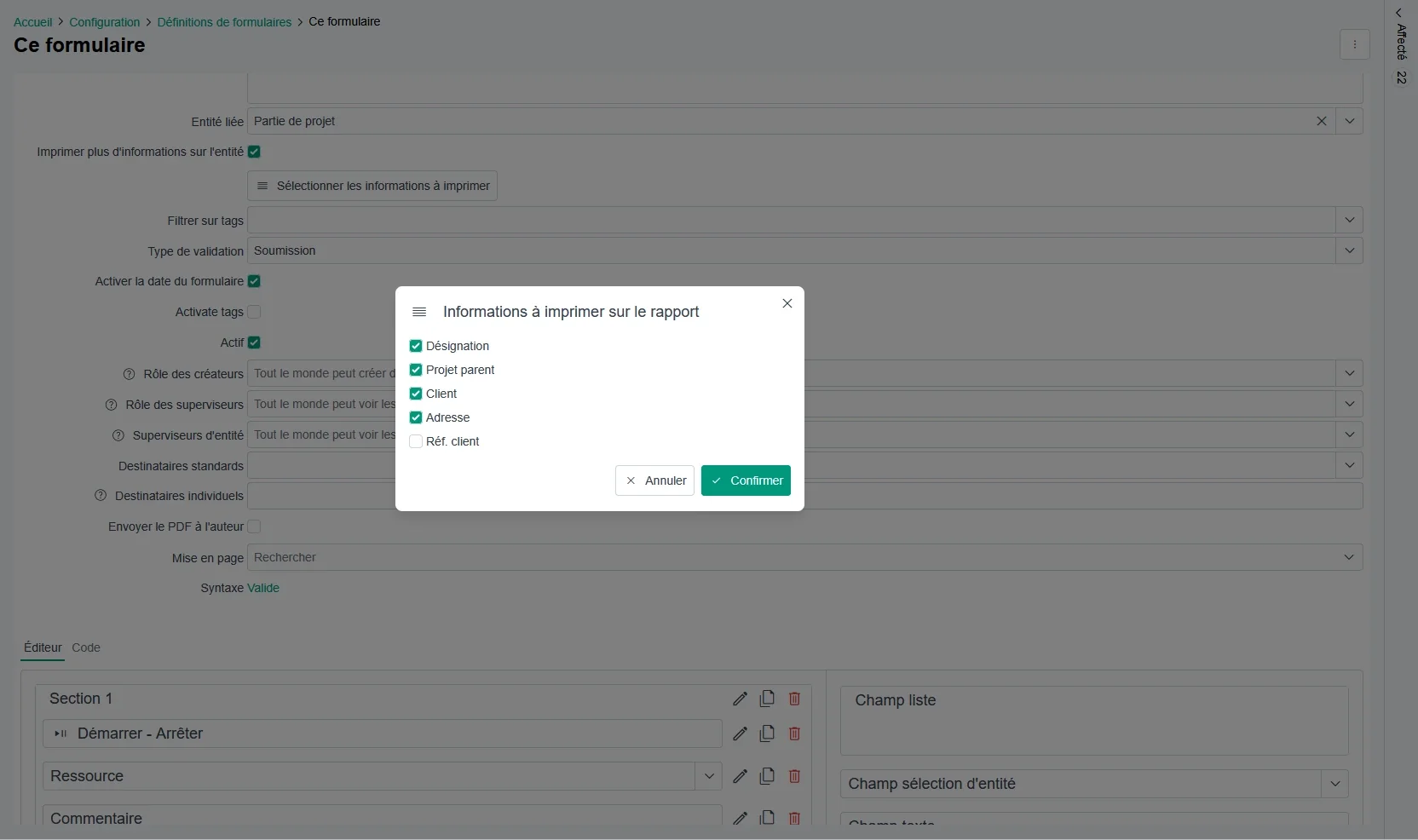
Printing entity information in forms
It is now possible to configure the automatic printing of information linked to the entities defined in a form.
Depending on the selected configuration, information associated with a customer, construction site, employee or another entity can be included directly in the printed document.
This development makes it possible to produce more complete reports without manually adding supplementary information.
Duplicating form definitions
Form definitions can now be duplicated.
This feature makes it possible to create a new template quickly from an existing definition. Fields, conditions and settings can then be adapted without restarting the entire configuration process.
Purchasing module
Adding statuses to purchasing documents
A status can now be added to purchasing documents, and the document list can be filtered by status.
This improvement simplifies the monitoring of requests, orders, receipts and other documents related to the purchasing process.
Users can more easily distinguish between documents being prepared, pending documents, completed documents and items requiring action.
Overdelivery control
A new configuration option controls delivered quantities in relation to ordered quantities.
Two behaviours are available. The company can accept the additional quantity and record the amount actually received, or it can reject the surplus and automatically limit the receipt to the quantity originally ordered.
This configuration makes it possible to adapt the receipt process to the company’s purchasing policy and prevent unwanted differences between orders and deliveries.
General configuration
Email notifications
Hit-Online notifications can now be sent automatically by email as soon as they are created, provided the option is activated in the general configuration.
Employees can therefore receive important information even when they are not logged in to the platform.
This makes it easier to monitor tasks, requests, alerts and events that require a prompt response.

Page breaks after headings
A new print option automatically inserts a page break after each level-one heading.
This setting makes it easier to create structured documents in which every major section must begin on a new page.
It can be used for reports, detailed offers, specifications or documents provided to customers.
File uploads
The file upload component now allows users to enter a custom designation when adding a document.
This designation is then displayed in the file panels.
Users can therefore identify the content of an attachment more easily without relying solely on its technical file name.
Direct page navigation
In all paginated lists, users can now click the current page number and enter the number of the page they want to open.
This improvement makes it easier to navigate through large lists and provides quicker access to a specific page.
Company currency
A new configuration option defines the default currency used by the company.
This currency can then be applied automatically in the relevant modules and documents.
The option is particularly useful for companies operating in several countries or using a currency different from the one originally configured in their environment.
A release designed to simplify daily processes
The August 2026 release continues the development of Hit-Online with functionality that addresses the practical requirements of construction companies.
Improvements to offers and projects make it easier to structure positions, duplicate data and monitor progress. New resource management options simplify the integration of supplier catalogues and help keep pricing information up to date.
In transactions, invoicing and purchasing, new statuses, additional controls and automatic validation strengthen the reliability of administrative and accounting processes.
Forms are also becoming more dynamic through tags, section-level conditions, personnel filtering and new rules for calculating hours.
Finally, improvements to the general configuration, notifications, printouts and navigation contribute to a smoother daily experience in Hit-Online.
With this release, Hit-Online continues to provide a centralised digital environment that helps companies organise information more effectively, reduce repetitive tasks and simplify collaboration between site teams, project managers and administrative employees.
See it for yourself - in 30 minutes
We show you Hit-Online live - tailored to your trade and your situation. No sales pitch, no pressure. Just an honest demo so you can see whether Hit-Online is the right fit for your business.