Release Notes – Hit-Online | September 2026
Release Notes – September 2026
The September 2026 release takes Hit-Online a major step forward, making everyday use more consistent, fluid and efficient both in the office and on site.
The main change is the redesigned user experience. Screens, tables, filters, forms and action buttons have been harmonised to provide familiar reference points across all modules. This redesign is accompanied by numerous functional improvements to third-party management, projects, transactions and purchasing.
This release also introduces a new Stock module. It helps identify resources, perform stocktakes, record material issues and anticipate replenishment needs. Personnel management also progresses with the introduction of mobility allowances and improved skills management.
Finally, several enhancements improve mobile working and provide greater control over communications generated from forms.
General configuration
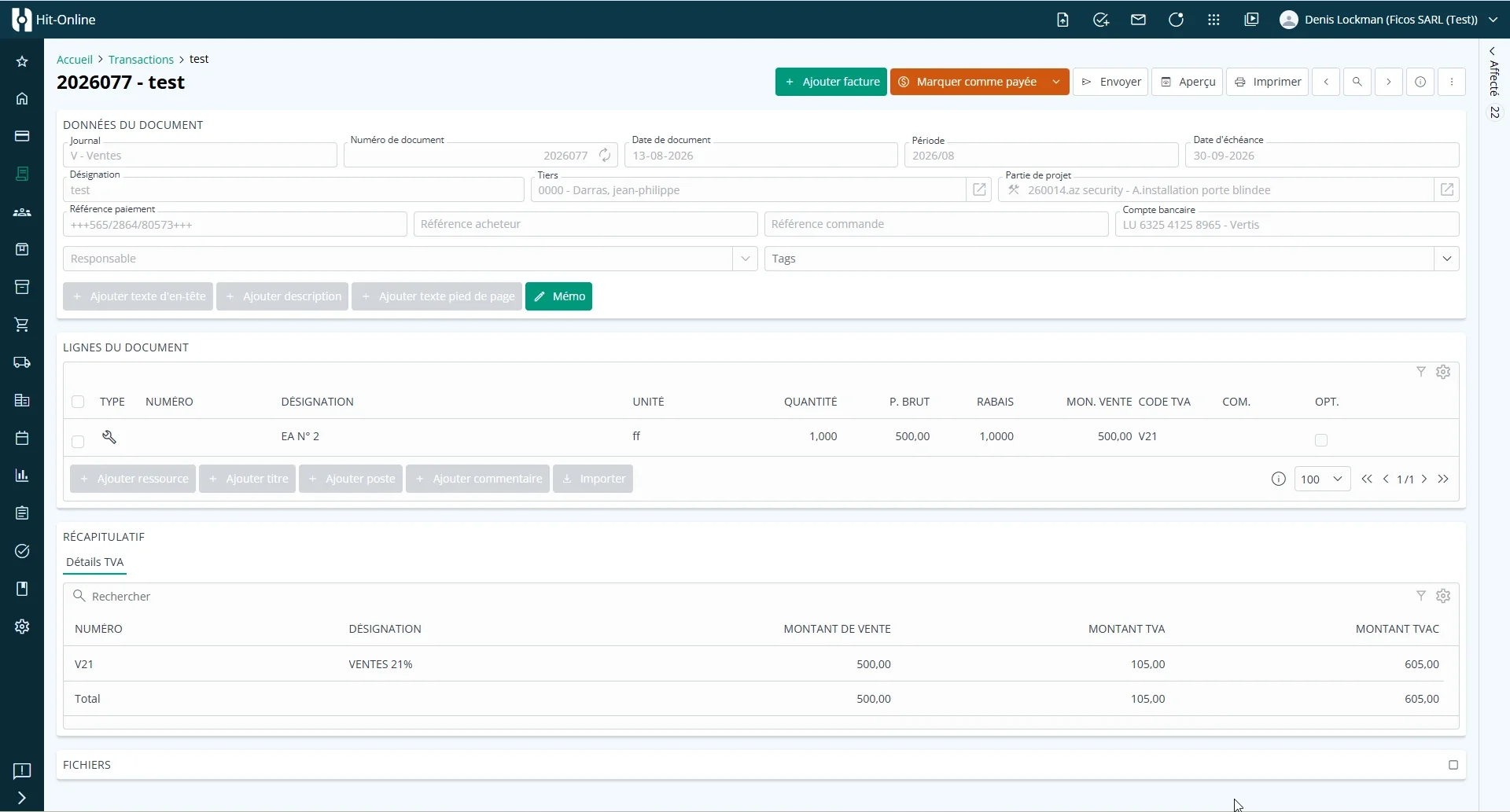
Redesigned and harmonised interface
Hit-Online now benefits from a major redesign of its interface and visual appearance.
The goal is to offer a more consistent, intuitive and pleasant experience, regardless of the feature being used. The application’s main interface components have been harmonised, including information displays, tables, filters, action buttons, forms and navigation.
The redesigned interface provides:
- a more consistent presentation from one screen to another;
- better readability of information;
- faster identification of available actions;
- more intuitive use of tables, filters and forms;
- better support for different screen sizes.
Beyond the visual update, the redesign simplifies everyday use of Hit-Online by applying common navigation and interaction principles throughout the application.
Company-specific administrator management — In testing
Administrator rights can now be defined individually for each company.
Previously, a user’s administrator status automatically applied to every company they could access. The same user can now be an administrator for one company and a standard user for another.
This change enables more precise permission management in multi-company environments.
To grant administrator status, go to Configuration > Users and select the Admin checkbox for the relevant company.
Mobile filters
Tables now include filters in their mobile view.
This makes it easier to find and review information on a smartphone or tablet, particularly while travelling or working on site.
Third-party management
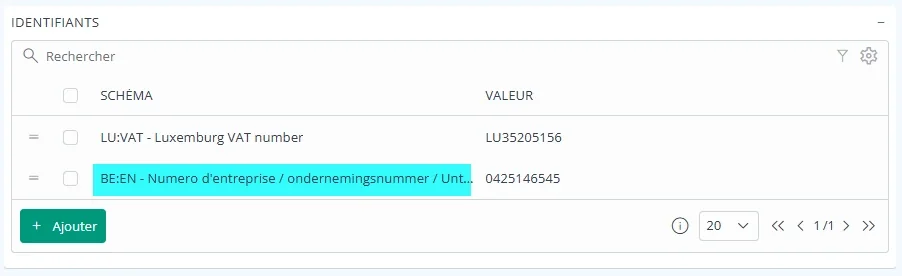
Third-party identifiers
When adding an identifier to a third party, selecting the corresponding scheme is now mandatory.
An identifier value can therefore no longer be saved without specifying its type or scheme. This improves the quality and consistency of stored data.
Duplicate identifier detection
The system now checks whether an entered identifier already exists for another third party.
This verification takes place:
- when a third party is created automatically by importing master data;
- during manual entry.
The aim is to prevent duplicate customer and supplier records and make their identification more reliable.

Projects
Invoicing a different third party
It is now possible to invoice a third party other than the one defined for the project section.
This provides greater flexibility when the beneficiary of the work and the invoice recipient are not the same party.
Payment plans
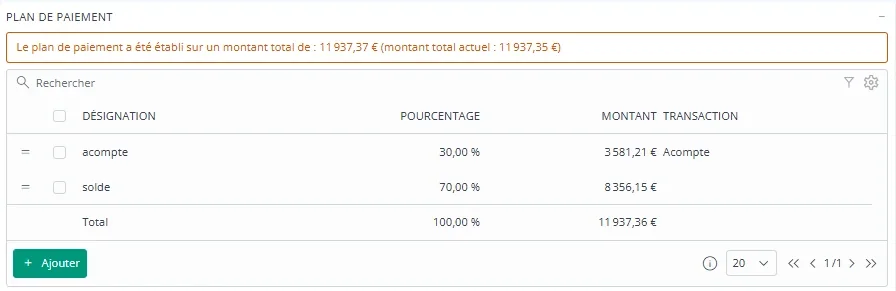
A payment plan can now be defined in a project section of the “Work” type.
When creating an invoice linked to the project, one or more lines from the plan can then be imported into the invoice. This makes it easier to manage projects billed in stages or according to a predefined schedule.
To use this feature, open the Payment plan panel in the project’s Work section, complete the individual stages and then use the payment-plan import function in the invoice.
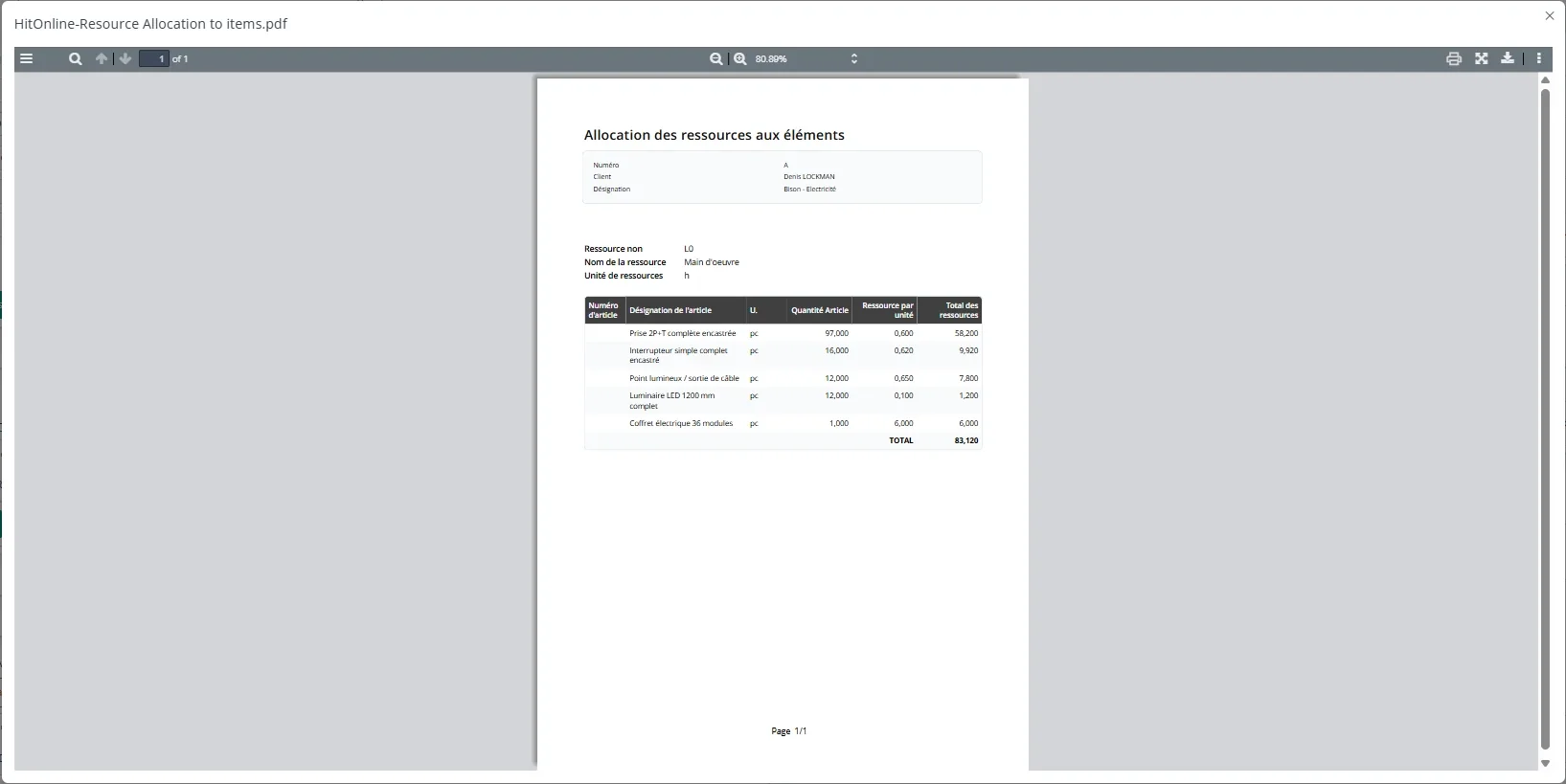
Resource allocation report for project items
The resource allocation report can be used to analyse the utilisation and performance of a specific resource within projects.
For example, users can select labour and review the expected output for each quotation item.
The report helps a company to:
- compare planned resources across quotation items;
- identify items requiring the most resources;
- review the performance assumptions used during estimating;
- analyse and optimise expected output using a detailed overview.
Transactions and invoicing
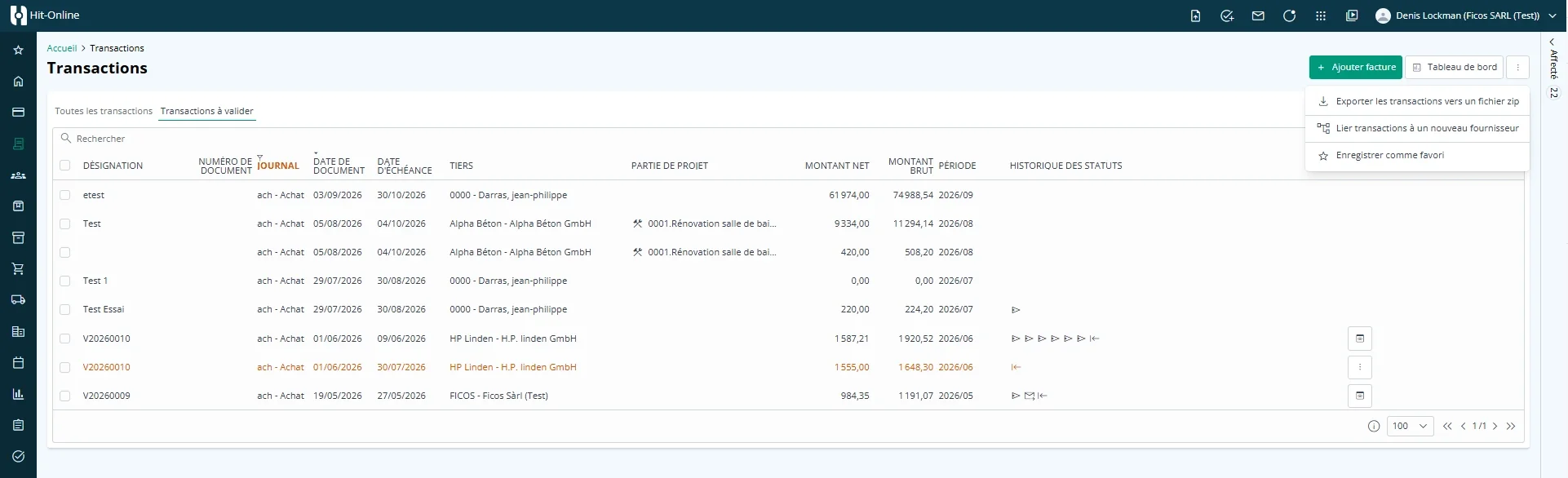
Automatic supplier search for incoming invoices
A new function finds the corresponding supplier for incoming invoices received through Peppol that are not yet linked to a supplier.
The search can be launched for the relevant invoices from the actions menu in the invoice list. The system retrieves an identifier from the invoice, such as the VAT number, searches for a supplier with that identifier and automatically links the supplier when a match is found.
This is particularly useful when a supplier was added to the system after its invoice was initially received.
Exporting invoices to Hit-Office
Hit-Office is now treated as external accounting software within the accounting export process.
Invoices imported into Hit-Office are therefore also included in the summary of invoices sent to accounting. This provides a more complete view of documents that have already been transferred.
Credit note configuration
A new setting defines the default behaviour for credit notes.
This option is available under Configuration > General > Default settings.
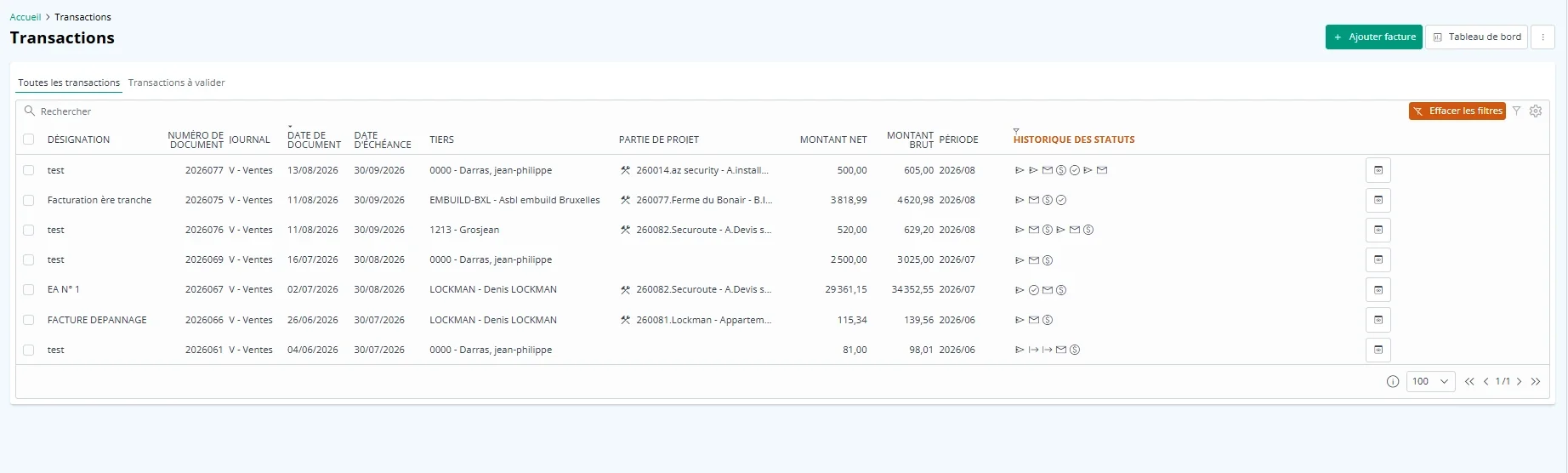
Transaction status history
The transaction list now includes a new column for status history.
A dedicated filter also makes this information directly usable from the list, allowing documents to be found more quickly based on the stages they have already passed through.
Purchasing module
The Purchasing module has been expanded to provide better use of information and more complete tracking of purchase documents, from identifying the need through receipt and supplier-invoice processing.
These developments make it easier to move from one document to another, improve delivery tracking and centralise more information directly in supplier records. The goal is a clearer, better-structured view of the purchasing cycle with less searching and manual work.
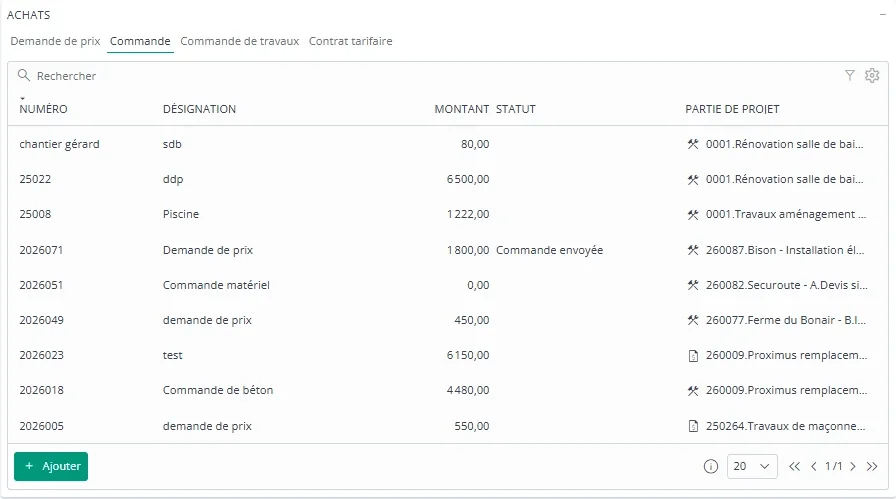
Purchase overview in the supplier record
The detailed supplier record now includes a summary table of its purchases.
Purchase information can be reviewed by document type directly from the supplier record.
Creating a delivery note without a purchase document
A delivery note can now be created without an existing purchase document.
In the Purchasing module, open the Delivery notes tab and click Add delivery note.
Importing project resources into a purchase document
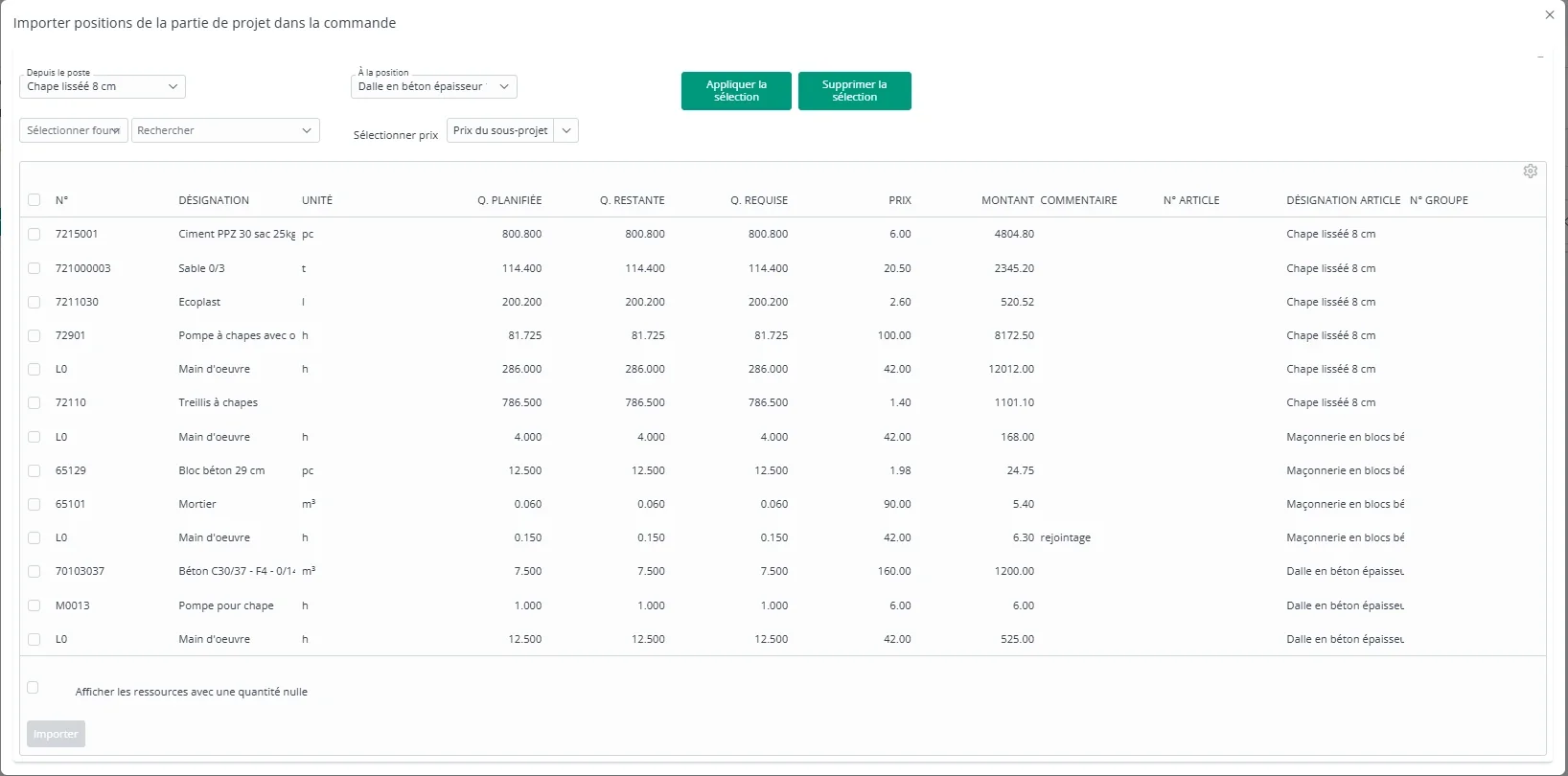
Resources planned in a project can now be imported directly into a purchase document.
During import, resources can be selected by bill-of-quantities item. Purchases can therefore be prepared according to the needs planned for each project item.
Automatic quantity tracking
When resources are selected, the system automatically takes account of quantities that have already been ordered and received.
The remaining quantities to order are displayed directly in the selection screen, helping to prevent duplicate orders and unintended over-ordering.
Open the purchase document’s items, select the function for importing project-section items into the order, and choose the required resources.
Supplier framework agreements
Framework agreements make it possible to define purchasing prices negotiated with a supplier in advance for a set of items.
The purpose is to centralise negotiated pricing terms and apply them easily when preparing orders.
Defining a framework agreement
A framework agreement is created for a supplier and lists the relevant items together with their negotiated purchase prices. It becomes the central reference for the terms agreed with that supplier.
Using a framework agreement in a purchase order
When preparing a supplier purchase order, the user can select the corresponding active framework agreement. The relevant items are then added using the negotiated prices defined in the agreement.
This feature helps to:
- ensure that negotiated prices are applied;
- avoid searching for or manually re-entering prices for every order;
- improve purchasing-price consistency;
- simplify the work of purchasing staff.
For example, if special prices have been negotiated for selected materials, they can be stored in the framework agreement and applied to every new order placed with the supplier.
Stock module
This release introduces the new Stock module, designed to track stored resources and support day-to-day material-management operations.
This first version covers the main processes required to identify items, monitor available quantities, record stock issues and anticipate replenishment needs.
Printing labels
The module can print labels for stock resources.
These labels help users identify items quickly, particularly during operations performed with the mobile application and a smartphone camera. They contain at least the resource identifier and can also identify the relevant stock location.
Select the required resources, click Print and choose the label template.
Stocktaking
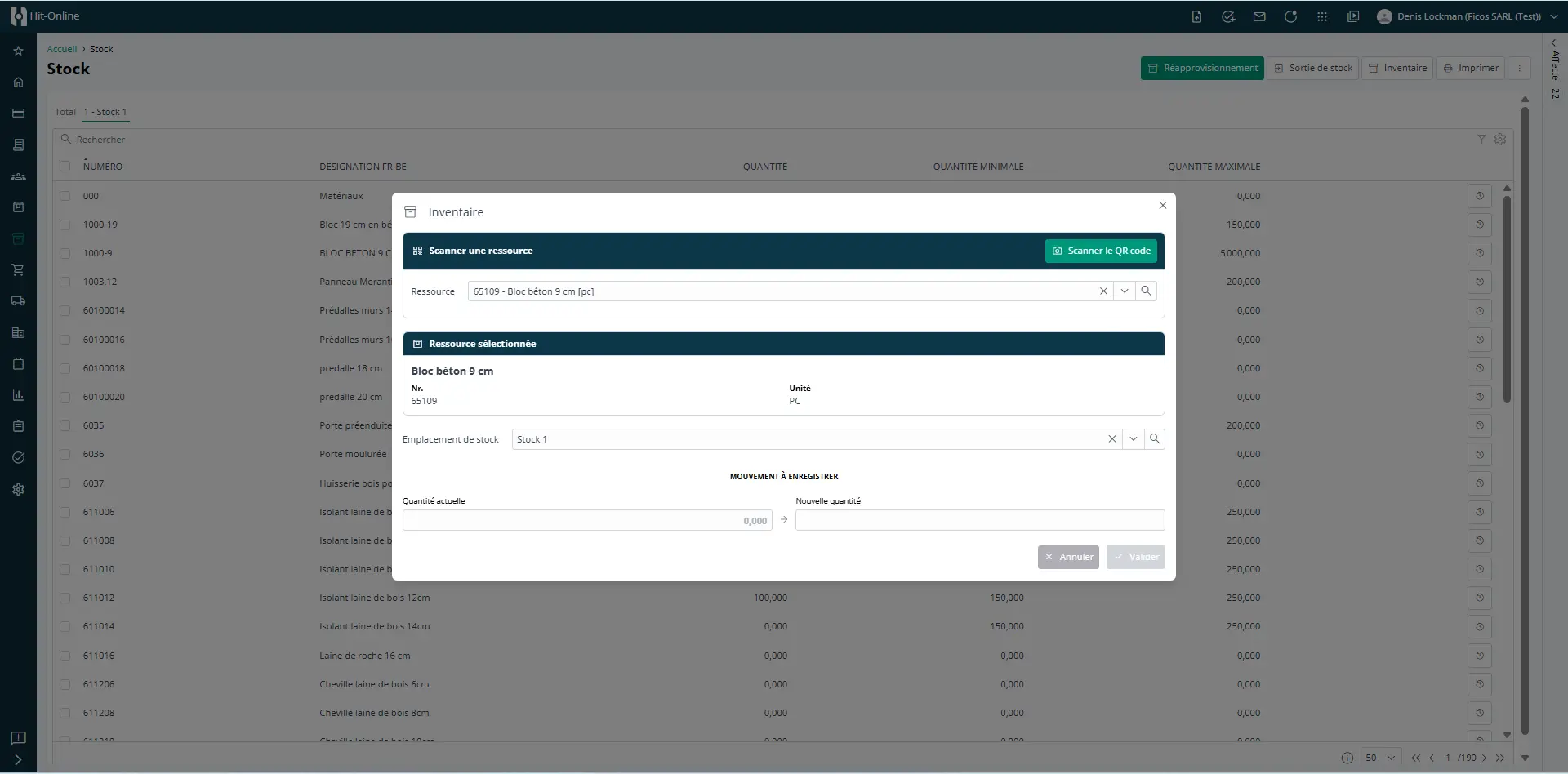
A stocktaking function can be used to check the quantities physically present and compare them with those recorded in the system.
In the Stock module, click Stocktake, select the resource manually or scan its QR code, enter the quantity counted and confirm.
Stock issues
Stock issues record resources taken from stock and automatically update the available quantities.
Two methods are available: directly from the Stock module or through a compatible form.
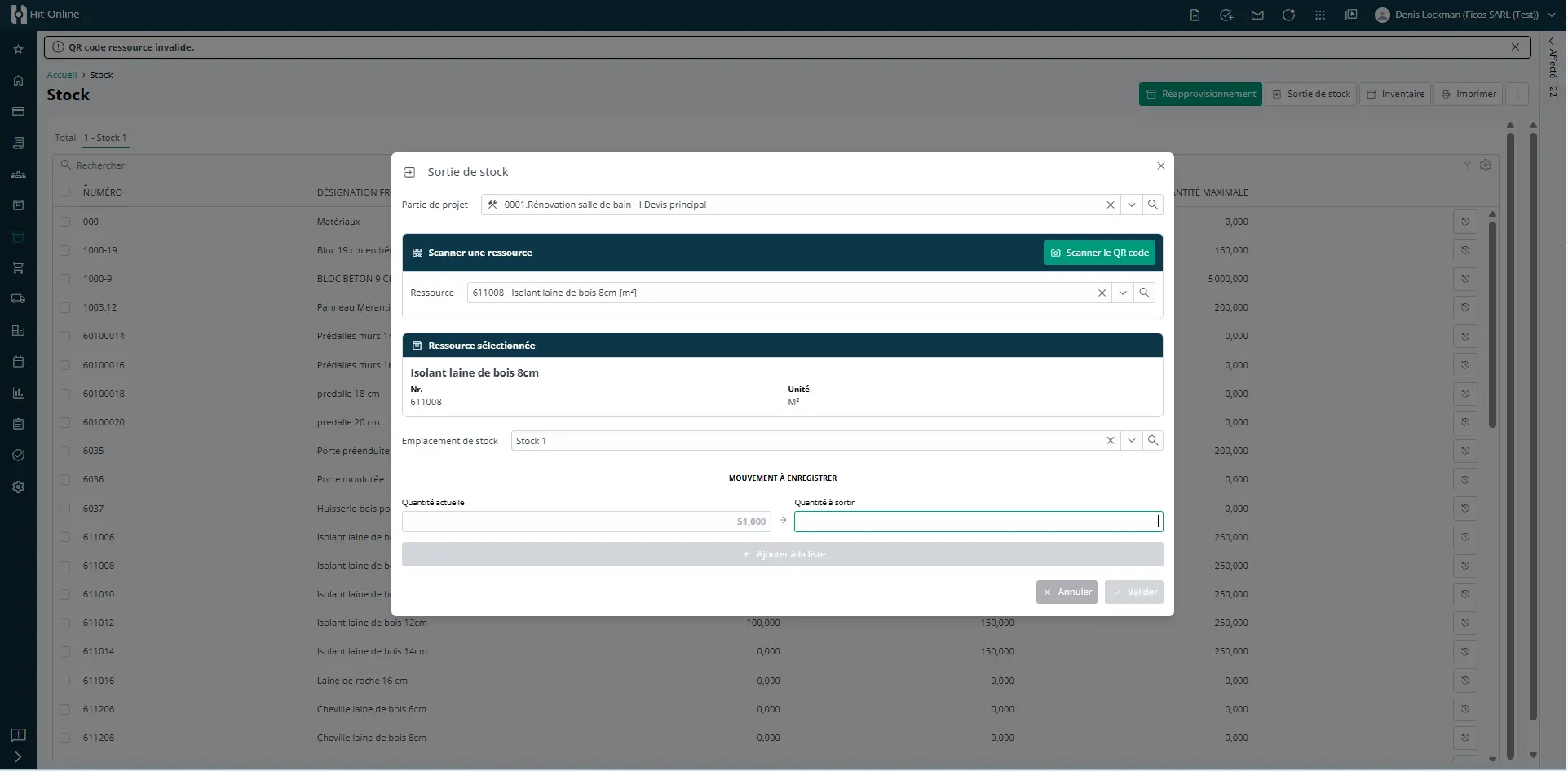
Issuing stock from the Stock module
A stock issue can be recorded directly in the module without using a form:
- Click Stock issue.
- Select the site to which the resources should be allocated.
- Select the resource or resources to be issued.
- Enter the issue quantity for each resource.
- Review the information and click Confirm.
The relevant quantities are then deducted from stock and the movement is recorded against the selected site.
Issuing stock from a form
Stock issues can also be integrated into certain forms, such as an intervention report.
In this case, resources can be identified by scanning their labels. Depending on the form configuration, manual entry may remain available or scanning may be mandatory.
This method is particularly well suited to operations performed directly on site using the mobile application.
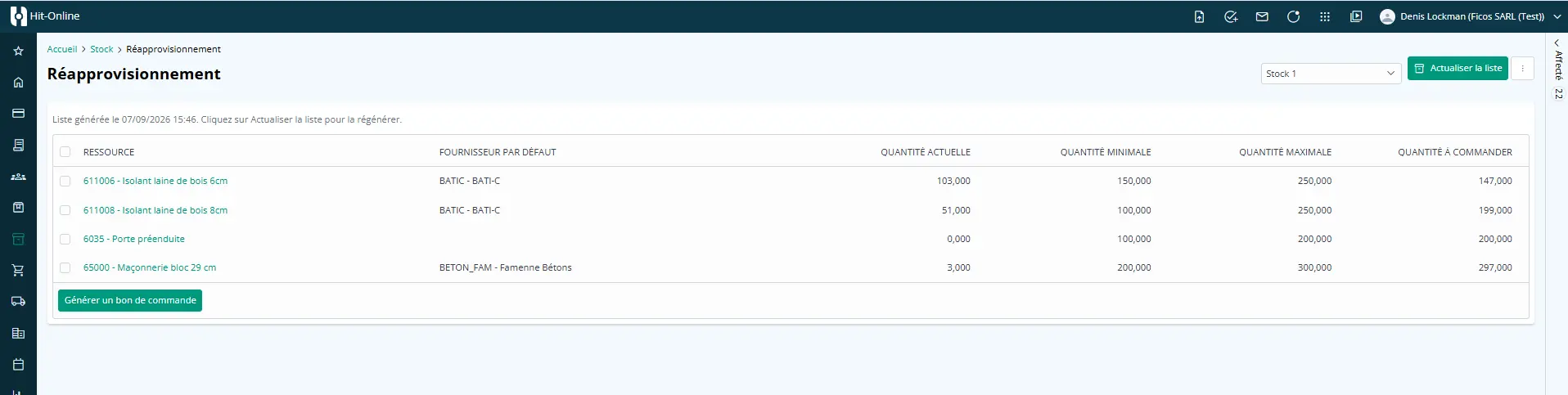
Identifying replenishment needs
The module can identify resources that need to be replenished.
Users can more easily spot items whose stock level requires a new order and respond before a shortage occurs.
This first release establishes the foundations of centralised stock management, from resource identification and movement tracking to replenishment planning.
Personnel
Mobility allowances
Mobility allowances are now available in Hit-Online. They make it possible to record mobility-related allowances for personnel activities and, depending on the configuration, include them in project cost tracking.
Configuring mobility allowances
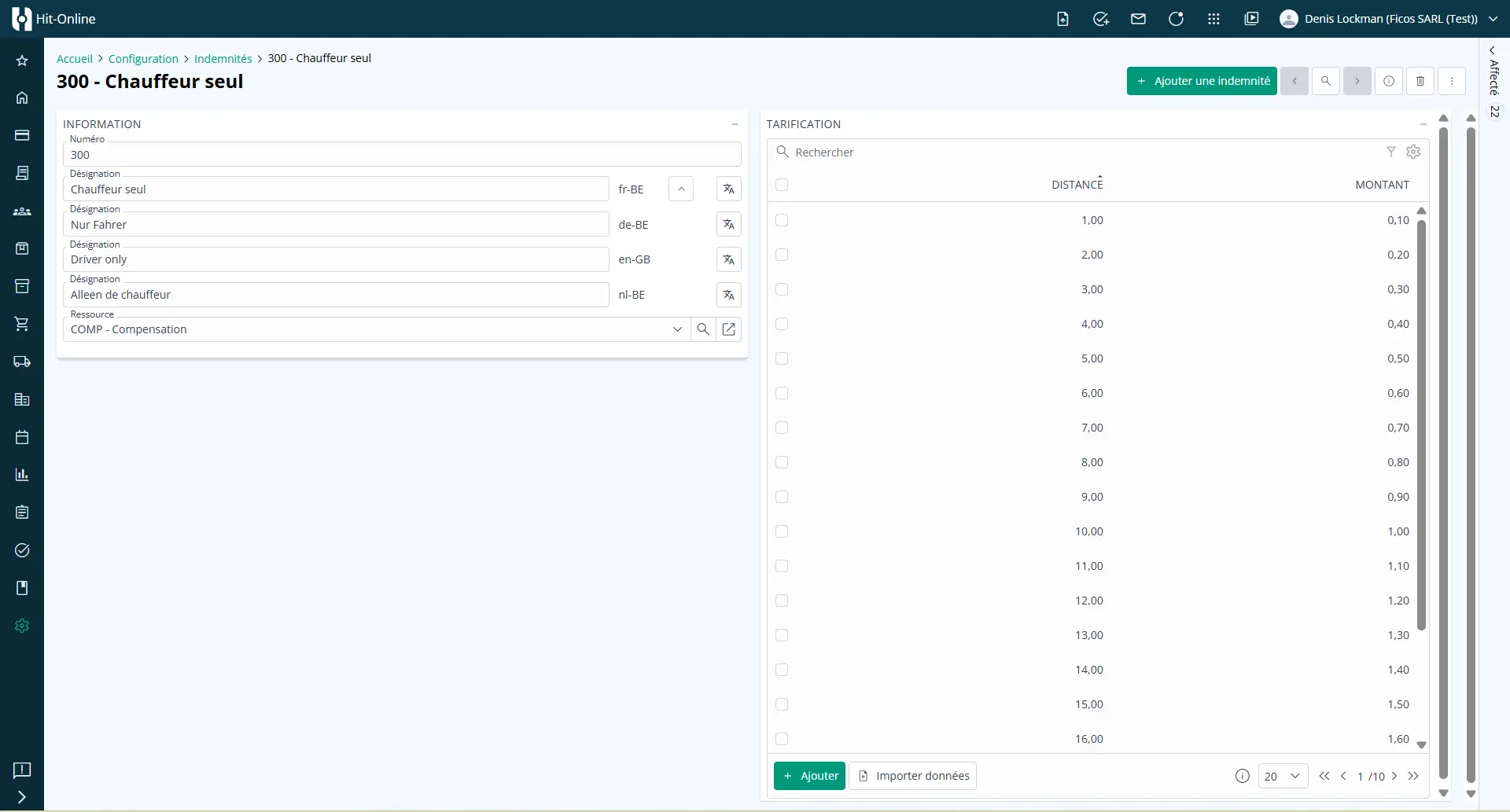
Before they can be used, mobility allowances must be defined under Configuration > Allowances.
This step creates the different allowances that can subsequently be selected when recording personnel activities.
Recording mobility allowances
Once configured, mobility allowances can be recorded in two ways:
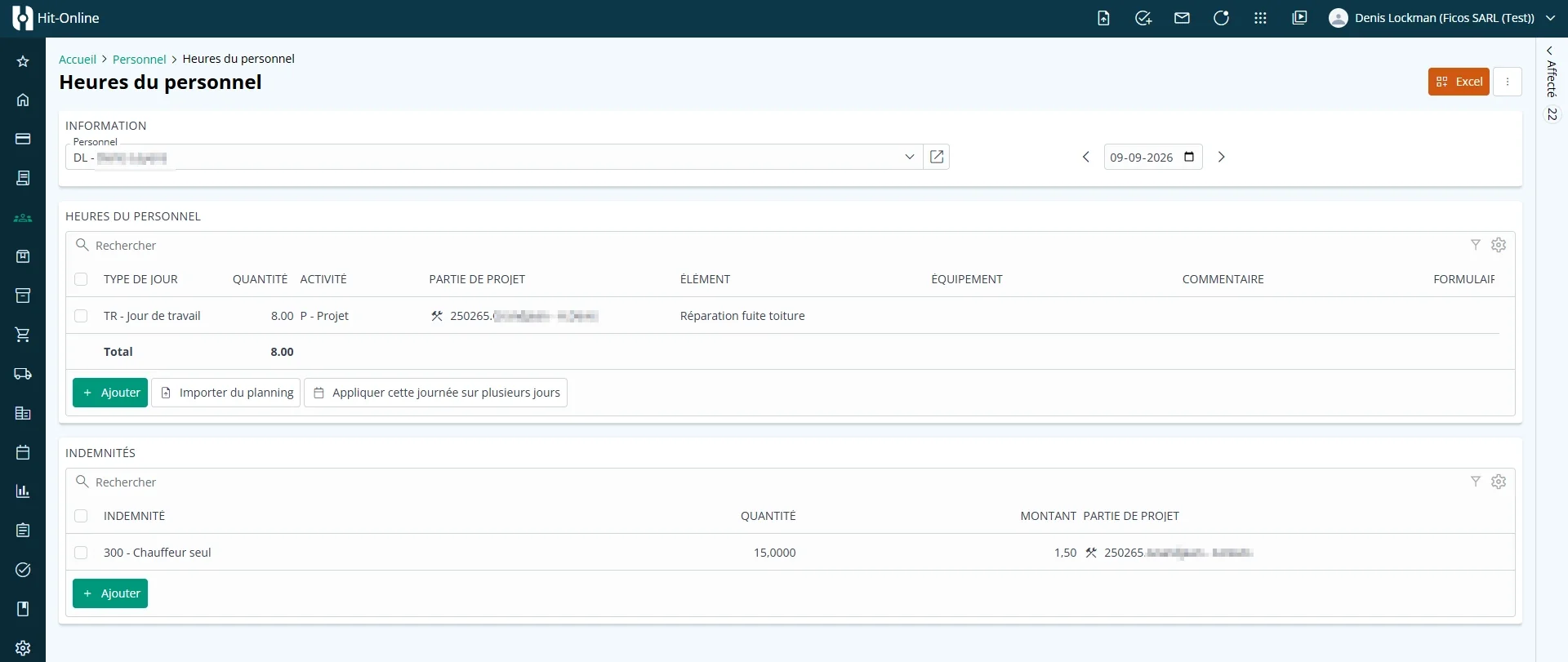
- manually in personnel hours: the user selects and records the mobility allowance while entering hours;
- from an activity form: the mobility allowance can be added automatically when an activity is saved through a form configured for this purpose.
Mobility allowances can therefore be integrated directly into the usual personnel activity-entry process.
Skills management
Personnel skills management has been enhanced to provide a better structure for information about employees’ skills and qualifications.
Forms
Controlling automatic email delivery
A new option in form definitions makes it possible to disable the automatic sending of an email.
When the option is enabled, the email can be sent manually at the appropriate time. This provides greater control over communications generated from forms.
A release focused on consistency and operational visibility
The September 2026 release makes Hit-Online more consistent through a harmonised interface and better-integrated functionality across its modules.
Payment plans and the ability to choose a different invoice recipient make project management and invoicing more flexible. Transactions are easier to track, while the new Purchasing features create a closer link between the needs planned in projects and the orders actually placed.
With the new Stock module, companies can monitor quantities, perform stocktakes, record material issues and anticipate replenishment. Mobility allowances and form enhancements further support teams working in the field.
Hit-Online therefore continues to pursue its core objective: centralising information, reducing manual work and providing construction companies with a clearer, more reliable and more efficient working environment.
See it for yourself - in 30 minutes
We show you Hit-Online live - tailored to your trade and your situation. No sales pitch, no pressure. Just an honest demo so you can see whether Hit-Online is the right fit for your business.